

Skip to content
Heyshift

Free Restaurant Shift Schedule Template

Plan opening, lunch, mid, dinner, closing, and split shifts for every station in one sheet. The template works for full-service restaurants, cafes, bars, hotel restaurants, and quick-service concepts.

Free download · No account required · CSV for Google Sheets

Free, no account required. To open the CSV in Google Sheets, use File > Import.
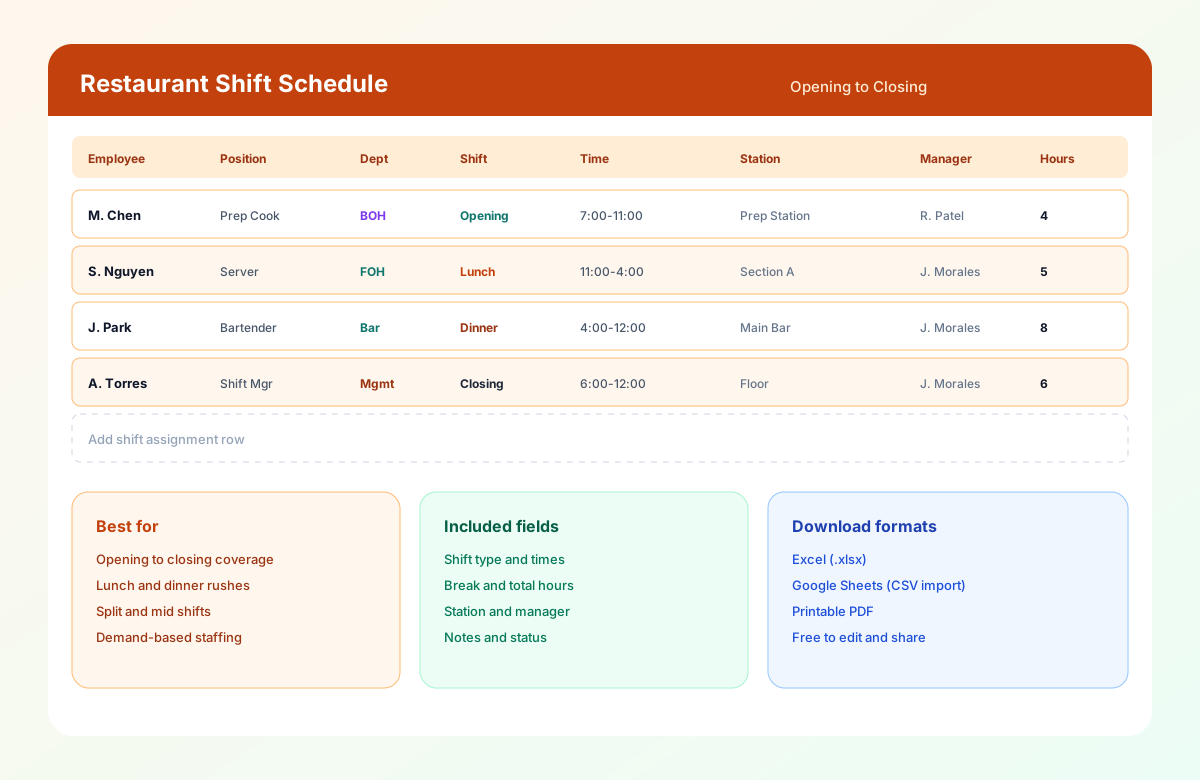
Restaurant shift schedule template showing opening, lunch, dinner, and closing assignments with stations, managers, and hours.

If you want a weekly grid with one row per person, use the restaurant employee schedule template. If you need station assignments for one day, use the restaurant staff schedule template.

What this template is for

This template plans service periods: who covers open, lunch, dinner, and close, at which station, and under which manager. Use it for full-service restaurants, cafes, bars, hotel restaurants, and quick-service concepts.

What's in the file

Field What to enter
Date / Week of The service day or week
Restaurant / Location Restaurant or site name
Shift lead The one manager who owns the posting
Service focus Brunch, private event, patio opening, or the night's priority
Employee Name of the person assigned
Position Server, line cook, bartender, host, and so on
Department FOH, BOH, bar
Shift type Open, lunch, mid, dinner, close, split
Start / End Times in the same format throughout
Break Length and whether it is paid
Total hours Calculates in Excel from Start and End (breaks not deducted)
Station Section, line station, or bar
Manager Who the employee reports to on that shift
Status Confirmed, pending, or needs coverage
Notes Events, large parties, training

Sample: Friday dinner for an 80-seat casual restaurant

This is a hypothetical starting point. Your headcount depends on your menu, layout, and forecast.

Position People Shift Hours each Total hours
Server 5 4:30 PM - 10:30 PM 6.0 30.0
Host 1 4:30 PM - 10:00 PM 5.5 5.5
Busser / runner 2 5:00 PM - 10:30 PM 5.5 11.0
Bartender 1 4:00 PM - 11:00 PM 7.0 7.0
Line cook 3 3:30 PM - 10:30 PM 7.0 21.0
Prep / expo 1 3:00 PM - 9:00 PM 6.0 6.0
Dishwasher 1 4:30 PM - 11:00 PM 6.5 6.5
Manager 1 3:30 PM - 11:00 PM 7.5 7.5
Total 15 94.5

Notice that start times are staggered. Cooks and the manager arrive before service for prep and a pre-shift meeting, and the dishwasher and bartender stay after close. A flat "everyone 4 PM to 11 PM" schedule would cost more and still miss prep.

Check the schedule against sales

Two numbers tell you whether a shift is staffed sensibly:

  • Labor cost % = labor cost ÷ sales
  • Sales per labor hour (SPLH) = sales ÷ labor hours

Use your own sales and wage numbers. This page does not set a target labor percent for every concept.

Shift types and typical time bands

Adjust to your own hours. These are common starting points.

Shift Typical band Main job
Open 2 to 3 hours before service Prep, setup, cash drawer, deliveries
Breakfast Opening to late morning Cafes and hotel restaurants
Lunch 11:00 AM - 2:30 PM Fast tables, fast ticket times
Mid 1:00 PM - 5:00 PM Overlap, handover, restock
Dinner 4:30 PM - close Full crew and the highest sales
Close Last hour of service through shutdown Cleaning, cash-out, food storage
Split Lunch, a break, then dinner Covers peaks without paying for the lull

Split shifts need extra care

A split shift can cover lunch and dinner peaks without paying for the quiet afternoon, but it is more regulated than a straight shift. Rules vary by state. For example, some states require extra pay when a split shift or a long spread between the first and last hour applies, and some require minimum pay for reporting to work. Check your state labor department before you rely on split shifts. See what is a split shift?.

Setup guide

How to use the template

List service periods first, then assign people. Keep one owner for changes after you publish.

  1. List service periods and operating hours

    Include kitchen, bar, takeout, and delivery hours, not only the dining-room open and close.

  2. Set shift bands

    Define open, lunch, mid, dinner, and close. Adjust the typical bands on this page to your own hours.

    What is a split shift?
  3. Forecast demand

    Use last year's same week, reservations, events, weather, and promotions. Do not copy last Tuesday's headcount blindly.

  4. Set coverage by position

    Use the Friday dinner sample as a starting point, then change counts for your seats and menu.

  5. Assign people

    Match role, availability, certification, and preferred hours. Check time off before you lock names.

    Availability form template
  6. Check hours and overtime

    Total hours across the full week, not only this service. Use the overtime risk calculator when you model extra hours.

    Overtime risk calculator
  7. Publish with one owner

    Give enough lead time and keep one person who owns changes after posting.

    How far in advance should schedules be published
Why use a template

What this shift sheet helps you see

  • Service-period coverage

    Open, lunch, dinner, and close are named shifts, not a single 4 p.m. to 11 p.m. block for everyone.

  • Staggered starts

    Cooks and the manager can arrive for prep while FOH arrives for service.

  • Station and manager on the row

    Section, line station, or bar, plus the one manager who owns the posting.

  • Hours you can total

    Scheduled hours sit on the row so you can check the week before payroll.

  • Status for gaps

    Confirmed, pending, or needs coverage, so the busiest night is not a silent hole.

  • Split shifts, when legal

    Cover lunch and dinner peaks without paying the lull, after you check state rules.

Mistakes this template helps you catch

  • Closing then opening the next morning with very little rest. Federal law does not set a rest period, but some cities do for certain employers, and tired staff hurt service either way.
  • Minors scheduled outside permitted hours. Check your state's rules for workers under 18.
  • Everyone arriving at the same time. Stagger starts to match prep and rush timing.
  • Tipped and non-tipped hours mixed up. Keep side work and prep hours easy to see so pay is correct.
  • No backup for the busiest night. Mark an "on call to be asked, not required" person and use open shifts rather than last-minute demands.

When to switch from a spreadsheet

A spreadsheet works well for one location and a stable team. Consider scheduling software when you have more than one location, frequent shift swaps, more than about 20 employees, availability that changes weekly, or overtime you only see after payroll.

Spreadsheet Heyshift
Manual shift planning Drag-and-drop shift building and templates
Static copies One published schedule on staff phones
Availability tracked by hand Availability and leave visible while you build
Swaps through text Swap requests with manager approval
Overtime found at payroll Hour totals visible while scheduling
Separate attendance system Attendance tracked beside the roster

See restaurant scheduling software when you are ready to compare the live week to this sheet.

Frequently asked questions

Is this restaurant shift schedule template free?

Yes. Download it free in Excel, CSV for Google Sheets, or PDF. No account is required, and you can edit it for your own hours and positions.

What is the difference between a shift schedule and a staff schedule?

A shift schedule organizes coverage by service period (open, lunch, dinner, close). A staff schedule gives the broader view of who works across departments and days. Many restaurants use both, one for coverage and one for the weekly roster.

How many people should I schedule per shift?

It depends on seats, menu, layout, and forecast. Use the sample above as a starting point, then compare labor cost % and sales per labor hour with your own actuals and adjust.

What is a good labor cost percentage for a restaurant?

It varies widely by concept, menu, and location. Many operators track it weekly against their own target rather than a universal number. Use your last several weeks as your baseline.

Can I schedule split shifts?

Yes, the template supports them. Check your state's rules first, because some states require extra pay for split shifts, long spreads of hours, or short call-ins.

How far ahead should I publish a restaurant schedule?

Many restaurants publish one to two weeks ahead. Some cities require advance notice for certain employers, so check local rules. See how far in advance should schedules be published.

Can I use it for multiple locations?

Yes. Add a Location column or use one tab per site. If you are managing several restaurants, see multi-location scheduling.

How do I use the CSV in Google Sheets?

Open Google Sheets, choose File > Import, upload the CSV, and select "Replace spreadsheet" or "Insert new sheet."

When should I move to scheduling software?

When you have several locations, frequent swaps and call-outs, or you only see overtime after payroll. Heyshift offers a 30-day free trial.

Keep exploring

More templates, guides, and tools for building and running your schedule.