

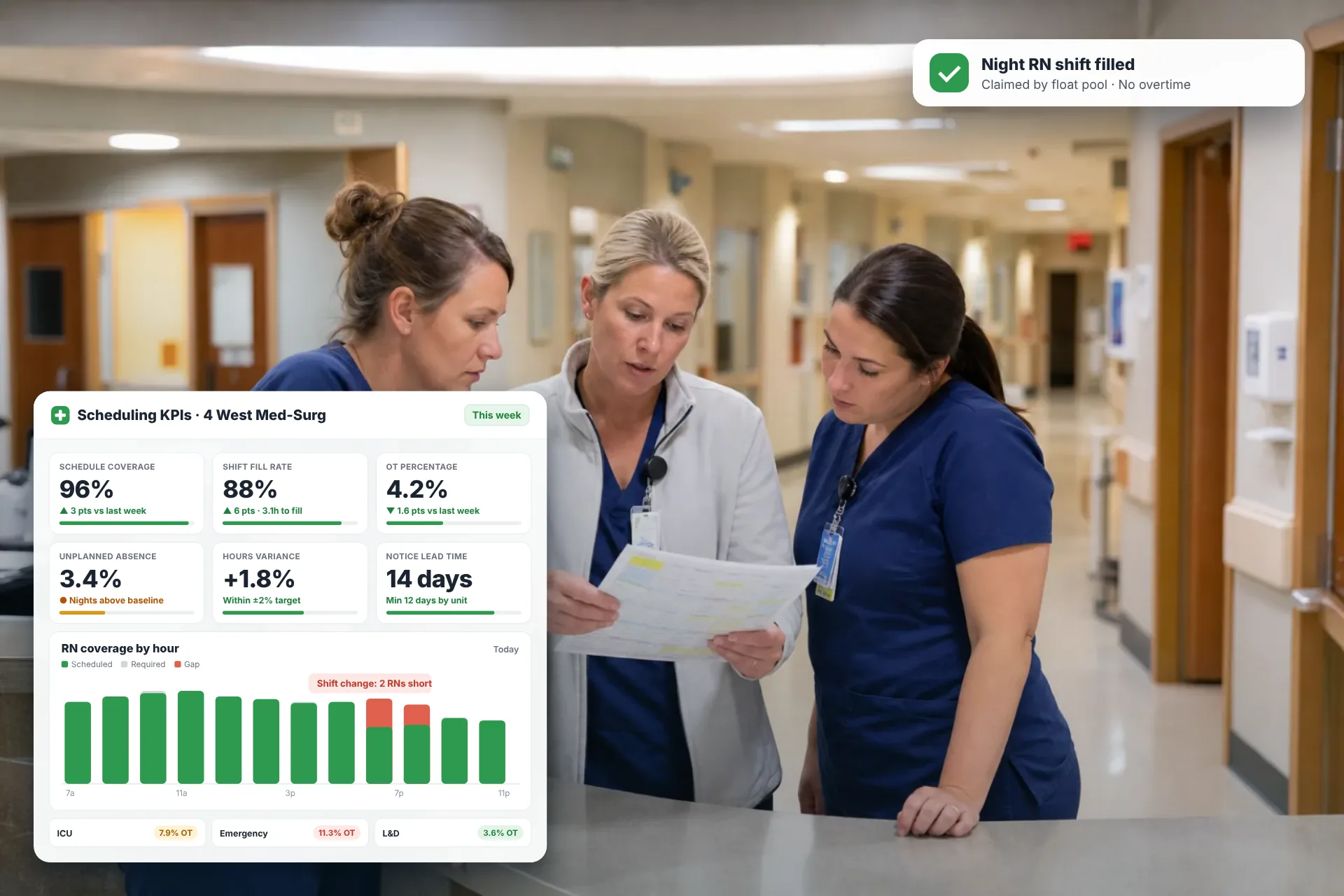
Employee Scheduling KPIs: 12 Metrics Every Operations Manager Should Track
Twelve employee scheduling KPIs with formulas, review cadences, and first actions, plus the trade-offs between them that most KPI lists skip.
Employee scheduling KPIs are the handful of numbers that tell you whether your schedule put the right people in the right place at the right cost. Most operations teams already have the raw data sitting in a scheduling tool, a time clock, and a payroll system. What's usually missing is a short list of metrics with agreed formulas, a set review rhythm, and a clear action for when each number moves.
Below you'll find all three for 12 metrics, plus the trade-offs between them that most KPI lists skip.
Quick answer: The 12 scheduling metrics worth tracking are schedule coverage, shift fill percentage, unplanned absence rate, OT percentage, labor cost percentage, hours variance, schedule adherence, post-publish change rate, schedule notice lead time, sales per labor hour, forecast accuracy, and preference match rate. Start with four to six of them, not all twelve.
What Are Employee Scheduling KPIs?
Employee scheduling KPIs are measurable indicators that show how well your schedules match demand, control labor spend, and hold up once the week actually starts. Any number you can pull from a schedule is a metric. It becomes a KPI only when you've decided it matters enough to review on a fixed cadence and to act on when it moves.
Here's a simple way to make sense of the whole category. Nearly every scheduling metric compares two of four numbers:
| Number | What it means | Where it usually lives |
|---|---|---|
| Required hours | The labor your forecast says the work needs | Demand forecast and labor standards |
| Scheduled hours | The labor you published | Scheduling software or spreadsheet |
| Worked hours | The labor that actually showed up | Time and attendance system |
| Paid cost | What payroll paid, including premiums and benefits | Payroll and finance |
Coverage compares scheduled to required. Variance compares worked to scheduled. Labor cost percentage compares paid cost to revenue. Seen this way, the KPI list stops looking like a random pile of ratios.
How Scheduling KPI Data Flows From Forecast to Dashboard
Scheduling KPIs are built from a chain of systems, and each link either adds a reliable number or quietly corrupts one. In a typical workforce management (WFM) setup, the pipeline runs like this:
- Demand forecast. Past sales, foot traffic, order volume, call volume, or patient census predicts the workload for each day and each hour.
- Labor standards. A rule turns workload into staff hours. For example, your own data might show one picker handles about 120 order lines an hour, so 1,200 lines in an hour means 10 pickers.
- Schedule build. A manager or software assigns people to shifts against that requirement, inside a labor budget and legal limits.
- Publish. The schedule goes to employees. The publish date matters for compliance and for measuring changes later.
- Changes after publish. Shift swaps, open shifts, call-outs, and manager edits reshape the plan.
- Time and attendance. Clock-in and clock-out punches record who actually worked and when.
- Payroll. Pay rates, shift differentials, and premiums turn worked hours into dollars.
- KPI layer. A report or dashboard joins steps 1 through 7 by location, department, day, and ideally by hour.
- Review and action. A named owner reads the numbers on a set cadence and changes something.
In many organizations, step 8 is where things break. When the forecast, schedule, and punches live in three separate systems, someone stitches exports together by hand, and the KPI arrives after the week it describes is over.
The 12 Scheduling KPIs at a Glance
The table below lists all 12 metrics with their formulas and a suggested review rhythm, and the sections after it explain how to use each one.
| # | KPI | Formula | Question it answers | Review |
|---|---|---|---|---|
| 1 | Schedule coverage | Scheduled hours ÷ required hours × 100 (per interval) | Did we staff to demand? | Daily |
| 2 | Shift fill percentage | Open shifts filled before start ÷ open shifts posted × 100 | Can we cover gaps fast? | Daily |
| 3 | Unplanned absence rate | Unplanned absence hours ÷ scheduled hours × 100 | How reliable is attendance? | Weekly |
| 4 | OT percentage | OT hours ÷ total hours worked × 100 | Are we paying premiums we didn't plan for? | Weekly |
| 5 | Labor cost percentage | Total labor cost ÷ net revenue × 100 | Is labor spend in line with the business? | Weekly and monthly |
| 6 | Hours variance | (Worked hours − scheduled hours) ÷ scheduled hours × 100 | Did the week run to plan? | Weekly |
| 7 | Schedule adherence | Shifts started and ended within grace window ÷ shifts scheduled × 100 | Do people work the plan? | Weekly |
| 8 | Post-publish change rate | Shifts changed after publish ÷ shifts published × 100 | How stable is the schedule? | Weekly |
| 9 | Schedule notice lead time | Average days from publish date to first shift | Are we giving enough notice? | Every schedule |
| 10 | Sales per labor hour | Revenue ÷ labor hours worked | Is labor turning into output? | Weekly and monthly |
| 11 | Forecast accuracy | 100 − MAPE | Can we trust the requirement? | Monthly |
| 12 | Preference match rate | Shifts matching stated availability ÷ shifts assigned × 100 | Do schedules work for staff? | Monthly |
Coverage and Staffing KPIs
Coverage and staffing KPIs tell you whether enough qualified people were working when the work was actually there. They're the first place to look when customers wait, orders slip, or supervisors keep saying they're short.
1. Schedule coverage rate
Schedule coverage measures the labor you scheduled against the labor your forecast says you need for a specific time block.
Formula: (Scheduled hours in interval ÷ Required hours in interval) × 100
Example: A distribution center needs 12 pickers from 2 p.m. to 4 p.m. and scheduled 9. Coverage for that window is 75%. The same day can still show 100% coverage overall if the morning carried three extra people. Daily averages hide exactly the hours that hurt.
What to do with it: Report understaffed and overstaffed hours separately so they can't cancel each other out. A schedule at 100% for the day but 75% at the afternoon peak usually needs shift start times moved, not more total hours.
2. Shift fill rate
Shift fill percentage measures the share of open shifts (unassigned, dropped, or vacated by a call-out) that someone picks up before the shift starts.
Formula: (Open shifts filled before start ÷ Open shifts posted) × 100
Example: Your team posts 40 open shifts in a week and 34 get claimed before they start. Fill percentage is 85%. The other six either ran short or went to someone already on shift, which tends to show up in OT.
What to do with it: Track time to fill (average hours from posting to claim) alongside it. A healthy fill percentage built on shifts claimed 30 minutes before start is a warning, not a win. If the number drops, check who can see open shifts, how fast they're notified, and whether cross-trained staff at nearby sites can claim them.
3. Unplanned absence rate
Unplanned absence rate measures the share of scheduled hours lost to call-outs, no-shows, and other absences nobody approved in advance.
Formula: (Unplanned absence hours ÷ Scheduled hours) × 100
Example: A call center schedules 3,200 agent hours in a week and loses 128 to sick calls and no-shows. The rate is 4%.
What to do with it: Keep approved PTO out of this number, since planned leave is a scheduling input. Break the rate down by day, shift type, and team. A spike concentrated on Saturday closing shifts often points to schedule design (like a "clopen," where someone closes late and opens early the next morning) before it points to individual attendance.
Cost KPIs
Cost KPIs connect the schedule to your profit and loss statement by showing whether labor spend tracks the business and where premium pay leaks in.
4. Overtime (OT) percentage
OT percentage measures how much of your worked time is paid at a premium rate.
Formula: (OT hours ÷ Total hours worked) × 100
Under the federal Fair Labor Standards Act, covered nonexempt employees must receive at least one and one-half times their regular rate of pay for hours past 40 in a workweek, according to the U.S. Department of Labor. The DOL also notes that some states have enacted their own OT laws, so the trigger for premium pay can differ by location.
Example: A team works 2,000 hours in a week and 140 of them are OT. That's 7%. Now dig in. If 110 of those 140 hours came from covering call-outs, the real fix lives in your fill percentage and absence rate, not in a memo telling managers to cut OT.
What to do with it: Split planned OT (a deliberate holiday-peak choice) from unplanned OT (shifts ran long or covered a gap). The unplanned share is the scheduling signal. Check hours-to-date by Wednesday so you can route open shifts away from people already close to 40.
5. Labor cost percentage
Labor cost percentage shows what share of revenue goes to paying the people who produce it.
Formula: (Total labor cost ÷ Net revenue) × 100
Decide up front what "total labor cost" includes, then keep that definition fixed. Counting wages alone understates the real figure. In the Bureau of Labor Statistics' Employer Costs for Employee Compensation release for June 2026, wages and salaries made up 70.0% of private-industry employer compensation costs, and benefits accounted for the other 30.0%. If one location reports wages only and another reports fully loaded cost, comparing them tells you nothing.
Example: A restaurant takes in $180,000 in a month and spends $54,000 on wages, payroll taxes, and benefits. Labor cost percentage is 30%.
Running this calculation by hand across several sites gets tedious, especially when you want to test what-if staffing levels before a busy season. To plug in your own numbers quickly, Heyshift's labor cost percentage calculator handles the math.
What to do with it: This ratio moves when either cost or revenue changes. Before cutting hours, check whether sales dipped, because trimming staff in a slow stretch can make it slower if service drops too.
6. Hours variance
Hours variance measures the gap between the labor you planned and the labor that actually happened.
There are two versions worth tracking:
- Schedule-to-actual: (Worked hours − Scheduled hours) ÷ Scheduled hours × 100. This shows whether the week ran to plan.
- Budget-to-schedule: (Scheduled hours − Budgeted hours) ÷ Budgeted hours × 100. This shows whether the plan fit the budget before the week began.
Example: A store schedules 600 hours and works 642. That's a 7% overrun. When you drill into the punches, you find early clock-ins, late clock-outs, and three shifts extended to unload a delivery that arrived two hours late.
What to do with it: The budget gap belongs to whoever builds the schedule, and the actuals gap belongs to whoever runs the floor. Clear early-punch rules and a grace window often close much of the actuals gap without touching the schedule.
Schedule Reliability KPIs
Schedule reliability KPIs show whether your published schedule is a plan people can actually count on, which affects retention, legal compliance, and, in at least one controlled study, sales.
7. Schedule adherence
Schedule adherence measures the share of shifts that start and end within an agreed grace window around the scheduled times.
Formula: (Shifts started and ended within grace window ÷ Shifts scheduled) × 100
Contact centers may track adherence minute by minute against planned breaks and lunches. For most other shift-based operations, a shift-level measure with a short grace window (say, five to seven minutes) gives you enough signal without micromanaging.
What to do with it: Low adherence clustered on one shift often means the shift is hard to reach on time, such as a 7:00 a.m. start that collides with school drop-off or a bus schedule. Moving that start time by 15 minutes can fix more than a write-up would.
8. Post-publish change rate
Post-publish change rate measures how much of the schedule changes after employees already have it.
Formula: (Shifts added, dropped, or moved after publish ÷ Shifts published) × 100
Split the changes by who started them. Employee-initiated changes, like approved shift swaps, are generally healthy flexibility. Manager-initiated changes made close to the shift date are the ones that strain people and, in some U.S. cities and states, trigger premium pay.
There's a business case for watching this closely. The Stable Scheduling Study, a randomized controlled experiment run with Gap Inc. in 28 stores in the San Francisco and Chicago areas from November 2015 to August 2016, tested practices such as posting schedules two weeks ahead and keeping shift times consistent. Researchers from UC Hastings, the University of Chicago, and UNC Kenan-Flagler reported that the treatment stores saw median sales rise 7% and labor productivity rise 5%. One retailer's result won't transfer to every operation, but it's a strong reason to treat schedule stability as an operations metric and not just an HR one.
A high change rate usually traces back to how the schedule was built in the first place, from a shaky forecast to shift templates that don't fit the demand curve. Want a refresher on getting that foundation right before you tune the metrics? Our workforce scheduling guide walks through the process step by step.
9. Schedule notice lead time
Schedule notice lead time measures the average number of days between publishing a schedule and the first shift it covers.
Formula: Sum of (first shift date − publish date) for each schedule ÷ Number of schedules published
In some U.S. locations, this metric doubles as a compliance control. Oregon's predictive scheduling law, enforced by the Bureau of Labor and Industries (BOLI), requires covered employers to give employees a written schedule at least 14 calendar days before the first day on it, and to pay additional compensation for changes made without that notice. The law covers retail, hospitality, and food service employers, and several cities, including San Francisco, Seattle, New York City, and Emeryville, California, have passed their own Fair Workweek-style scheduling rules. Coverage thresholds and details differ by jurisdiction, so confirm what applies to you with employment counsel.
What to do with it: Track the minimum lead time by location, not just the company average. One site publishing nine days out can create compliance exposure even if the overall average is a comfortable 16 days.
Productivity and Planning KPIs
Productivity and planning KPIs test whether paid hours turn into output and whether your demand forecast deserves the trust your whole schedule rests on.
10. Sales per labor hour (SPLH)
Sales per labor hour measures how much revenue each worked hour produces.
Formula: Revenue ÷ Labor hours worked
If revenue isn't the right output for your operation, swap in the unit that is: order lines picked per labor hour in a warehouse, patients seen per nursing hour in a clinic, or tickets resolved per agent hour in support.
Example: A store earns $42,000 in a week on 1,050 labor hours, so SPLH is $40. Break it down by daypart. If Tuesday morning runs $22 and Saturday afternoon runs $61, you probably have labor sitting idle early in the week and stretched thin on weekends.
What to do with it: A low daypart suggests moving hours elsewhere. A very high one is worth a second look too, because it can mean understaffing that costs you sales you never see, like shoppers who leave a long checkout line.
11. Forecast accuracy
Forecast accuracy measures how close predicted demand came to actual demand, and it decides whether your coverage numbers mean anything at all.
Formula: Forecast accuracy = 100 − MAPE, where MAPE (mean absolute percentage error) is the average of (|Actual − Forecast| ÷ Actual) × 100 across your intervals.
Example: For one hour you forecast 500 orders and get 400, an error of 25%. For the next you forecast 300 and get 330, an error of about 9.1%. MAPE across the two is about 17%, so forecast accuracy is about 83%.
What to do with it: Exclude very low-volume intervals (like overnight) or use a volume-weighted error, because tiny denominators inflate MAPE. If coverage looks perfect but supervisors still say they're short, check forecast accuracy first. Full coverage against a bad forecast is a precise answer to the wrong question.
Employee Experience KPI
The employee experience KPI shows whether your schedules work for the people who have to live with them, which feeds directly into absence, turnover, and how hard open shifts are to fill.
12. Preference match rate
Preference match rate measures the share of assigned shifts that fit what employees told you about their availability and preferences.
Formula: (Assigned shifts that match stated availability and preferences ÷ Total assigned shifts) × 100
Example: Out of 900 shifts assigned in a month, 774 match each person's submitted availability and preferred shift type. The rate is 86%.
What to do with it: Collect availability in a structured format (days, time ranges, max hours), not texts and sticky notes. Then check the distribution: if a few people absorb most closing and weekend shifts, rotate them before it turns into resignations. Each quarter, compare turnover by schedule pattern.
Which Scheduling KPIs Pull Against Each Other?
Several scheduling KPIs trade off against each other, so improving one in isolation can quietly damage another. The safest habit is to read them in pairs.
| If you push this... | Watch this | Why |
|---|---|---|
| Labor cost percentage down | Peak-hour coverage, SPLH | Hour cuts often land in the busiest windows |
| OT percentage down | Fill percentage, absence rate | Fewer people are free to pick up open shifts |
| Post-publish change rate down | Coverage, hours variance | A locked schedule can't flex for a demand spike |
| Adherence up through stricter rules | Preference match, absence rate | Rigid rules can push people to call out instead |
| Fill percentage up through pickup bonuses | Labor cost percentage | Incentives add cost per filled shift |
Put each pair on the same dashboard view. A manager who sees only labor cost percentage will cut hours. A manager who sees it next to peak-hour coverage is more likely to move hours instead, and that's usually the better call.
How Often Should You Review Schedule KPIs?
Review each metric at the cadence where you can still act on it: daily for live coverage, weekly for cost and reliability, monthly for productivity and planning, and quarterly for strategy.
| Cadence | KPIs to review | Who owns it | Decisions it drives |
|---|---|---|---|
| Daily | Coverage for today and tomorrow, open shift fill, call-outs | Shift leads, site managers | Fill gaps, approve premium hours, move people between areas |
| Weekly | OT percentage, labor cost percentage, hours variance, adherence, change rate, notice lead time | Site and operations managers | Adjust next week's schedule, address punch patterns |
| Monthly | SPLH, forecast accuracy, preference match, labor cost trend | Operations leaders, WFM team, finance | Update labor standards, forecast inputs, shift templates |
| Quarterly | All chosen KPIs by location, turnover by schedule pattern | Operations leadership, HR | Budgets, scheduling policy, technology decisions |
For leadership, one page per location works well: your chosen KPIs, this period against last period and target, a one-line note on anything out of range, and the action taken.
What to Do When a Scheduling KPI Moves
Each KPI on your dashboard should come with a pre-agreed first response, so a bad number triggers an action instead of a meeting about the number.
| Signal | Likely cause | First action |
|---|---|---|
| Coverage dips at the same hours every week | Shift start times don't match the demand curve | Stagger start times or add short peak shifts |
| Fill percentage falling | Too few eligible people see open shifts | Widen eligibility, cross-train, notify sooner |
| OT percentage climbing mid-week | Hours aren't checked until payroll runs | Review hours-to-date by Wednesday |
| Hours variance stays positive | Early clock-ins and late clock-outs | Enforce punch windows and review edits |
| Change rate spiking | Forecast misses or late planning | Publish earlier and fix forecast inputs |
| Absence clustered on specific shifts | Shift design, such as clopens or short notice | Redesign the shift, then talk to the team |
| SPLH low in one daypart | Overstaffing in that window | Move hours to busier windows |
| Forecast accuracy slipping | Stale history or missing events | Add promotions, holidays, and local events to the forecast |
Set your triggers against your own baseline rather than generic industry targets. A rule like "two consecutive weeks outside our normal range" is easier to defend, and easier to act on, than a benchmark built from operations that look nothing like yours.
How to Start Tracking Scheduling KPIs Without Drowning in Dashboards
Start with four to six KPIs tied to your most expensive scheduling problem, prove the data is clean, and add more only once the first set is driving decisions.
- Name the problem. Is premium pay eating margin, are customers waiting, or are people quitting?
- Pick the KPIs that diagnose it. A premium-pay problem calls for OT percentage, fill percentage, absence rate, and hours variance.
- Write a definition sheet. Record each formula, data source, and what's included (does labor cost include benefits?).
- Baseline before you target. Collect four to eight weeks of data before setting goals.
- Assign an owner and a trigger. One named person and one pre-agreed first action per KPI.
- Automate the data join. Connect forecast, schedule, time clock, and payroll so numbers arrive while you can still act.
- Revisit the set quarterly. Drop KPIs nobody acts on.
Not every operation needs all 12. A single location with ten employees and one manager who builds the schedule in an afternoon will catch most problems with coverage, OT percentage, and labor cost percentage reviewed weekly. The full set of employee scheduling KPIs earns its keep when you run multiple sites, round-the-clock shifts, or a labor budget large enough that a one-point swing in labor cost percentage is real money.
One more ground rule. Use person-level data for coaching and for fixing the system, not for surveillance. If staff believe the numbers exist to catch them out, adherence and absence data get gamed, and the KPIs stop telling you the truth.
Limitations: What Scheduling KPIs Can't Tell You
Scheduling KPIs show what happened to hours and labor spend, but they can't explain why on their own, and they're only as accurate as the forecast, labor standards, and punch data underneath them.
- They look backward. Most of these metrics describe last week. They're useful for fixing next week, but they won't rescue a shift that's already short.
- Bad inputs produce confident wrong answers. If your labor standard says six people can handle the lunch rush and the real number is eight, coverage will read 100% while the floor is underwater.
- Averages hide the pain. Company-wide numbers can look fine while one location, one daypart, or one overworked employee carries the problem.
- They don't measure quality. A perfectly efficient schedule can still produce long waits, errors, or safety incidents. Pair scheduling metrics with customer, quality, and safety measures.
- They can be gamed. Managers can hit a labor cost target by trimming hours that customers needed, or move swaps off the books to protect a change-rate number.
None of this is a reason to skip employee scheduling KPIs. It's a reason to treat them as questions worth asking, not verdicts.
Put a Dollar Value on Better Scheduling
The fastest way to decide which KPIs to fix first is to estimate what your current scheduling problems are costing in OT, wasted hours, and turnover. Once you have that number, it's much easier to justify a change in process or tools to finance and leadership.
Heyshift's scheduling ROI calculator lets you enter your own labor numbers and see the potential return in a few minutes. Run it now, pick the two or three KPIs tied to your biggest cost, and start tracking them this week.
Frequently Asked Questions
Continue with related topics
More articles on topics related to this one.
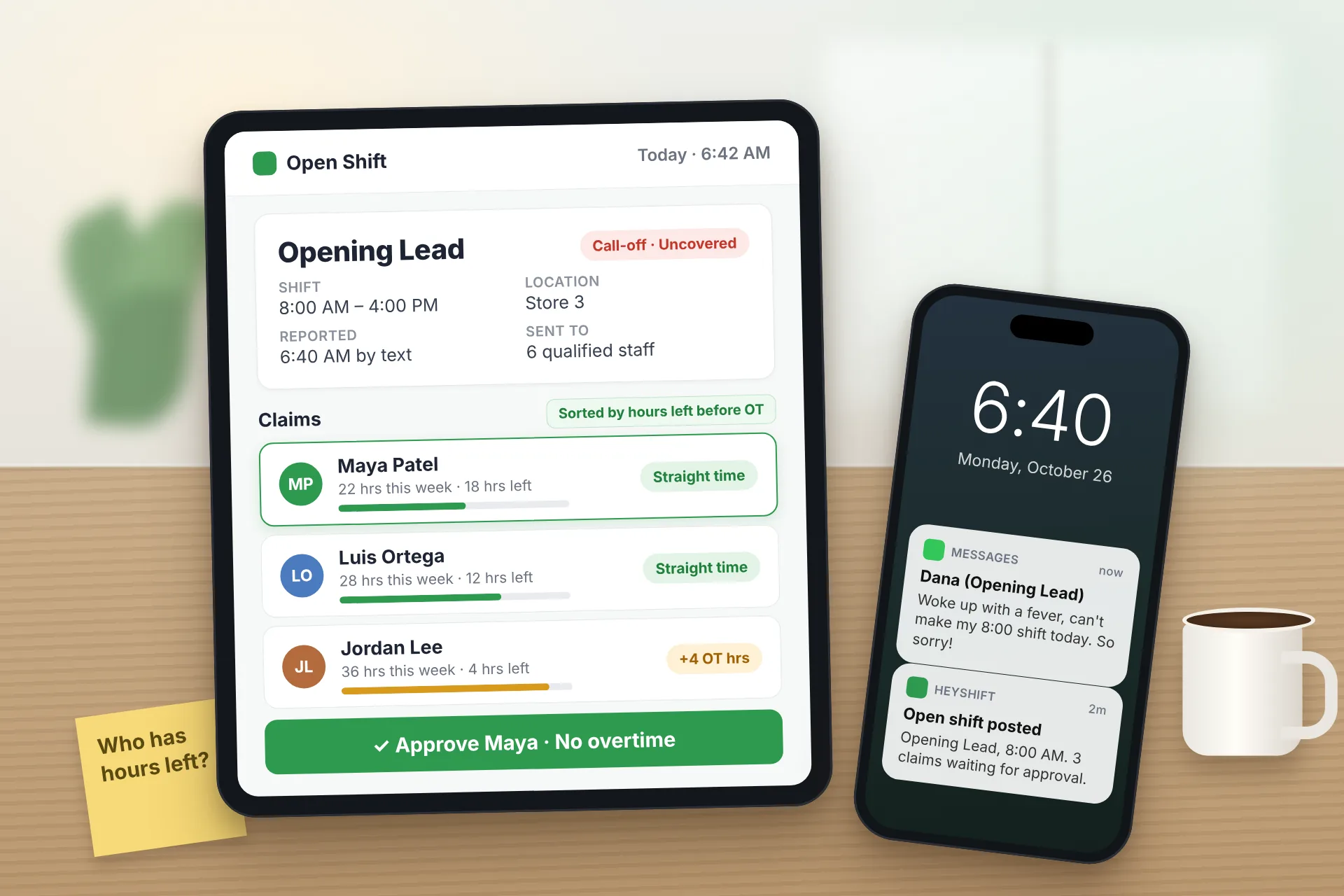
Same Day Employee Call Off Coverage: How to Handle Call-Offs Without Creating Overtime
A 30-minute response sequence for same-day call-offs: build a qualified list, post an open shift to everyone at once, and check overtime before you approve anyone.
Read article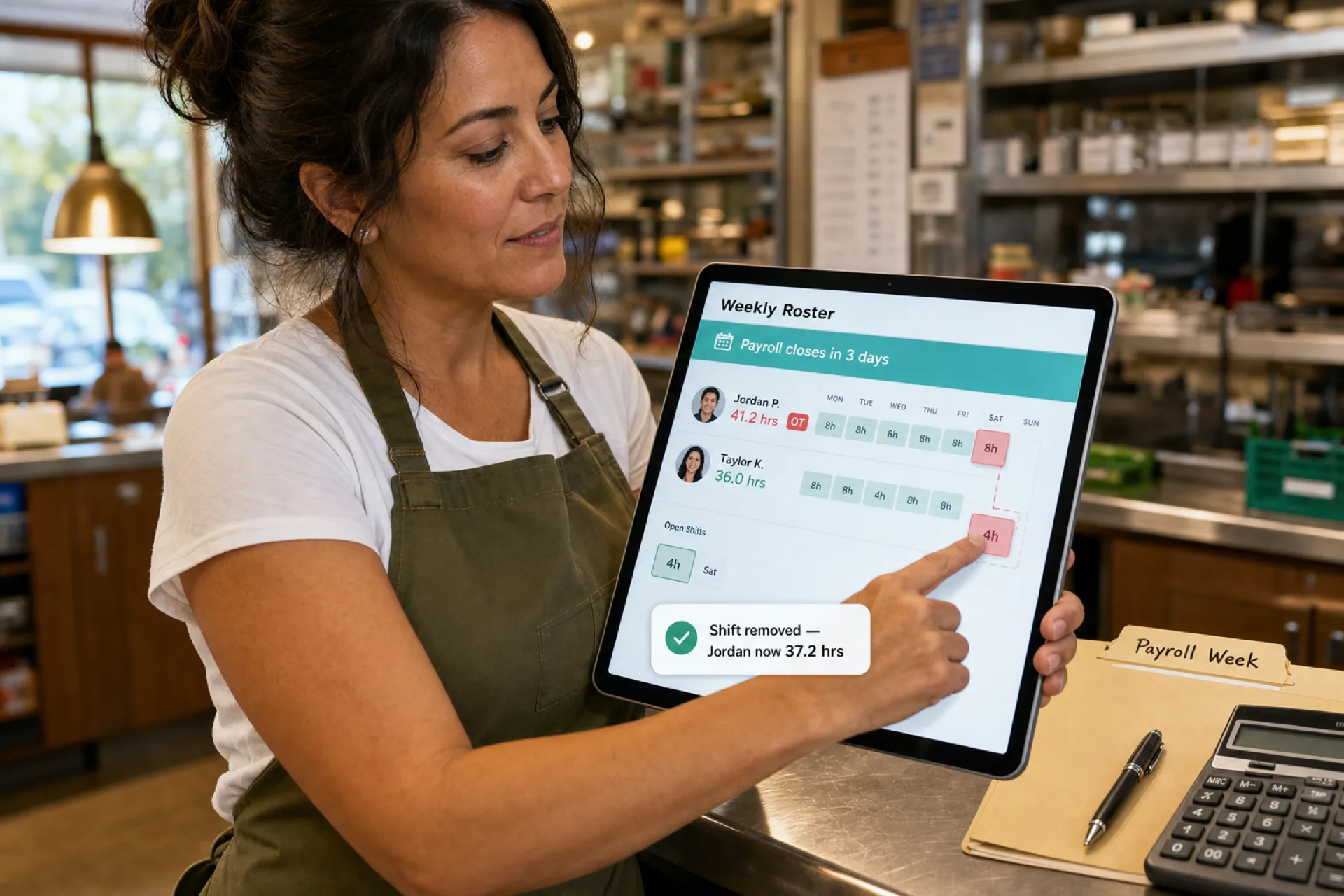
How to prevent overtime before payroll (2026 guide)
Learn how to prevent overtime before payroll with weekly hour monitoring, labor budgets, swap controls, and workforce scheduling visibility for growing USA teams.
Read article
Healthcare staff scheduling software with compliance tracking: features, benefits, and how to choose
Compare healthcare staff scheduling software with compliance tracking. See qualifications, credentials, training, and assignments in one staff workflow.
Read article