


Dental Practice Scheduling Software for Staff Management (2026)
Discover how dental practice scheduling software helps manage staff shifts, availability, attendance, leave, shift changes, and overtime across dental practices and multiple locations.
Dental practice scheduling software for staff management (2026)
Tuesday opens with six hygiene chairs booked and one hygienist short because the swap never reached the published roster. The office manager rebuilds the week in Excel while the front desk texts two float assistants who already picked up shifts at another office in the group. Payroll exports a schedule that does not match what staff actually worked.
If you search dental practice scheduling software, you need more than patient appointment booking in your practice management system. You need staff shift grids that match chair and operatory demand, availability captured before assign, manager-approved swaps, open shift fill on mobile, leave beside the grid, and attendance aligned with the official week.
Running a dental practice requires coordinating dentists, hygienists, dental assistants, receptionists, office managers, and other staff. Employees may have different working hours, availability, leave schedules, and responsibilities. As a practice grows or adds locations, managing these schedules manually becomes increasingly difficult. Dental staff scheduling software buyers in 2026 are evaluating tools that publish one roster clinical and support teams trust, not a file that changes five times before the first patient arrives.
This guide explains what dental office scheduling software should deliver: why dental practices need better staff scheduling, common problems with manual methods, essential features, benefits, practice types, a practical multi-location example, comparison with Excel, how to choose, how Heyshift helps, FAQ.
Featured answer: What is dental practice scheduling software? Dental practice scheduling software helps dental offices create employee schedules, manage availability and shift changes, track attendance, manage leave, and coordinate dentists, hygienists, assistants, and front-office staff from a centralized platform.
Who should read this: Dental practice owners, office managers, DSO operations leaders, HR teams, and administrators comparing dental employee scheduling software before demos. For vendor comparisons, see best employee scheduling software for dental practices.
Executive summary
Dental practice scheduling software worth adopting in 2026 publishes one official week for every hourly and salaried support role, fills call-offs through open shifts on mobile, and keeps attendance beside the roster finance exports.
Dental practice scheduling software provides a centralized way to manage staff schedules while improving visibility into staffing and working hours as practices add chairs, providers, and locations.
In this guide you will find:
- Why dental practices need better staff scheduling
- Common scheduling problems with spreadsheets and messages
- Features every dental buyer should prioritize
- Benefits for admin time, conflicts, communication, and overtime
- Best fit by practice type
- A practical multi-location dental group example
- Dental scheduling software vs Excel
- How to choose the right platform and FAQ
Table of contents
- Why dental practices need better staff scheduling
- Common dental staff scheduling problems
- Features to look for in dental staff scheduling software
- Benefits of dental practice scheduling software
- Who can use dental practice scheduling software?
- Example: managing a multi-location dental practice
- Dental practice scheduling software vs Excel
- Why choose Heyshift?
- How to choose dental practice scheduling software
- Frequently asked questions
- Final thoughts
Why dental practices need better staff scheduling
Dental offices run on appointment-linked coverage: dentists, hygienists, assistants, and front desk must align with chair volume and procedure mix, not a static weekly grid copied from last month. Dental workforce management software replaces that friction with publish-first discipline.
Multiple employee roles
A single practice day may need two dentists in operatories, three hygienists in hygiene bays, assistants rotating between rooms, reception for check-in peaks, and an office manager coordinating sterilization and billing support. Dentist staff scheduling software keeps role clarity on one grid instead of separate files per department.
Different working hours
General dentistry opens early for hygiene blocks; orthodontic sites run after-school peaks; emergency slots extend evenings. Shift templates and copy-week reduce rebuild time when hours change seasonally.
Employee availability
Part-time hygienists, assistants with school-age children, and per diem float staff need availability captured before assign. That cuts the text thread volume office managers handle every Sunday.
Vacation and leave
Approved PTO for a lead hygienist must appear while building next week's grid. Explore leave management and healthcare leave management best practices.
Last-minute call-outs
When a hygienist calls in sick, open shifts on mobile beat phone trees. Read reduce no-shows and call-offs.
Shift coverage
Uncovered hygiene blocks delay patients immediately. Dental hygienist scheduling software workflows post open shifts to qualified staff with manager approval.
Overtime
Visible hour totals while building shifts help owners pace labor before payroll close. Pair software with healthcare overtime management.
Part-time employees
Many dental teams blend full-time, part-time, and per diem roles. Availability and hour caps on one roster prevent accidental over-assign.
Multiple dental locations
Growing groups and dental service organizations need multi-location roll-up so float hygienists and assistants do not double-book across offices. See multi-location scheduling software.
Common dental staff scheduling problems
Manual methods fail predictably as headcount, chair count, and location count grow. Dental practice employee scheduling buyers usually outgrow spreadsheets when they pass roughly 12 to 18 hourly staff, add a second operatory cluster, or run multi-provider days weekly.
Scheduling conflicts
When availability lives in texts and the official grid lives in Excel, the same assistant appears on two operatories or two sites at once.
Double-booked employees
Float staff shared across offices double-book when locations maintain separate files without one system of record.
Uncovered shifts
Without open shift posts on mobile, managers lose hours while hygiene chairs sit empty or dentists wait for assistant support.
Difficult shift changes
Swap agreements in group chat never update the official week payroll uses. Managers rebuild manually after every change.
Poor communication
Employees learn about schedule changes from coworkers, not from publish alerts on the official roster.
Manual attendance tracking
When punches live in one tool and schedules in another, reconciliation becomes a manual merge every period.
Limited overtime visibility
Hour totals hidden until payroll close turn into labor surprises instead of decisions made while building shifts.
Too much administrative work
Office managers spend Sunday nights rebuilding grids instead of preparing for Monday chair utilization.
Read why spreadsheets fail for workforce scheduling and open shift and swap approvals for habits that complement software.
Features to look for in dental staff scheduling software
When evaluating dental assistant scheduling software and full-practice platforms, prioritize capabilities that match how dental teams actually work.
Employee scheduling
Build and publish staff schedules quickly with templates, copy-week, and role bands tied to hygiene and operatory blocks.
Employee availability
See when dentists, hygienists, assistants, and other employees are available before assign. Explore people and availability.
Open shifts
Identify uncovered shifts and find available employees through mobile notifications instead of call lists.
Shift swaps
Allow employees to request shift changes while maintaining manager approval on the published roster.
Leave management
Manage vacations, sick leave, and other absences alongside schedules without separate spreadsheets.
Attendance tracking
Compare scheduled shifts with actual attendance beside the grid. See attendance tracking and healthcare attendance tracking best practices.
Time tracking
Monitor employee working hours and potential overtime before payroll close. Pair with attendance management software.
Mobile access
Allow employees to view schedules and updates from phones between patients or before commutes (mobile app).
Multi-location scheduling
Manage employees across multiple dental offices with site tags and roll-up reporting (multi-location areas).
Workforce reporting
Review staffing, attendance, hours, and overtime by location and role.
| Feature | Why dental teams need it |
|---|---|
| Employee scheduling | Match hygienists and assistants to chair demand |
| Availability and leave | PTO beside grid prevents surprise gaps |
| Swaps and open shifts | Fill call-offs without phone trees |
| Attendance | Planned vs worked hours finance trusts |
| Mobile access | Hygienists and assistants see updates on the floor |
| Multi-location | One account for growing dental groups |
| Reporting | Overtime pacing before payroll close |
This article focuses on staff scheduling, not patient appointment booking in your PMS. Strong dental office scheduling software handles employee rosters, attendance, leave, and labor visibility. Confirm in trial that staff publish workflows fit your chair and hygiene band patterns.
Benefits of dental practice scheduling software
The right dental employee scheduling software pays back in labor cost, staff experience, and patient throughput.
Save administrative time
Reduce the time spent manually creating and updating employee schedules when templates and swap workflows replace rebuilds.
Reduce scheduling conflicts
Keep employee availability and schedules in one centralized system across roles, chairs, and locations.
Improve staff communication
Give employees access to current schedules and schedule updates through one system instead of scattered messages.
Improve overtime visibility
Monitor working hours and identify potential overtime earlier while building the week.
Simplify multi-location management
Coordinate employees across multiple dental offices from one platform with consistent publish rules.
Support practice growth
A centralized scheduling system can scale as a practice adds employees, chairs, and locations without adding another spreadsheet owner.
Who can use dental practice scheduling software?
Different dental settings share scheduling pain with different emphasis.
General dental practices
Coordinate dentists, hygienists, assistants, and front-office teams on one publish-first grid tied to daily chair utilization.
Multi-dentist practices
Manage larger teams with different working schedules, shared assistants, and float coverage between operatories.
Dental groups
Centralize scheduling across multiple offices with roll-up hours and consistent swap approval. Compare best scheduling software for multi-location businesses.
Pediatric dental practices
Coordinate clinical and administrative staff around after-school peaks and parent-friendly hours.
Orthodontic practices
Manage orthodontists, assistants, hygienists where applicable, and support teams across longer patient blocks and adjustment days.
Specialty dental practices
Oral surgery, periodontics, and endodontics run procedure-heavy days where assistant and surgical support coverage matters as much as front desk bands.
Independent single-location practices
Solo and small groups benefit once hourly headcount, hygiene volume, or a second location exceeds spreadsheet capacity.
Example: managing a multi-location dental practice
Consider a dental group operating four offices with dentists, hygienists, dental assistants, receptionists, and office managers at each site. Each location previously maintained separate spreadsheets. When an employee called out, managers contacted staff individually to find coverage while patients waited in hygiene chairs.
A centralized dental practice scheduling software workflow changes that pattern:
- View schedules across locations with site tags and roll-up reporting
- Check employee availability before publish instead of after conflicts appear
- Identify open shifts and post them to qualified hygienists and assistants on mobile
- Manage shift swaps with manager approval on the official roster
- Track attendance beside published shifts for payroll reconciliation
- Monitor working hours with overtime indicators while building the grid
- Manage leave so approved PTO appears before assign
- Communicate schedule changes through publish alerts, not group chat
Regional leadership still allows local office managers to publish for their sites, but float staff and shared labor costs stay visible before payroll close. That is the practical difference between four "final" Excel files and publish-first dental staff scheduling software.
Dental practice scheduling software vs Excel
| Area | Scheduling software | Excel |
|---|---|---|
| Schedule creation | Centralized publish with templates | Manual rebuild each week |
| Availability | Integrated before assign | Often separate notes or texts |
| Open shifts | Mobile posts to eligible staff | Manual call lists |
| Shift swaps | Structured manager approval | Side deals in group chat |
| Attendance | Centralized beside roster | Often separate punch export |
| Mobile access | Designed for hygienist and assistant phones | Limited or screenshot sharing |
| Notifications | Publish alerts on official roster | Manual texts and emails |
| Multiple locations | One account with site roll-up | Multiple files per office |
| Reporting | Built-in workforce visibility | Manual pivot tables |
Excel works for very small teams with one location and stable weekly patterns. Dental workforce management software wins when float pools, multi-chair days, or multi-site groups exceed one office manager's spreadsheet discipline.
Why choose Heyshift?
Heyshift addresses the problems discussed above with scheduling, attendance, and communication in one workflow, without unsupported superlative claims.
Employee scheduling and shift planning
Build weeks with templates and copy-week. Publish one official roster staff open on mobile. See what is employee shift planning.
Employee availability, open shifts, and shift swaps
Capture constraints before publish. Fill call-offs through manager-approved swaps and open shifts on the official roster.
Attendance tracking and time tracking
Track attendance beside scheduled shifts so managers see planned vs worked hours before payroll close.
Leave management
PTO and leave requests beside the grid prevent publish surprises when approved time off was never on the schedule.
Mobile access and multi-location workforce management
Hygienists and assistants check shifts, request swaps, and pick up open shifts from phones. Schedule multiple dental offices from one account.
Workforce reporting
Hours, coverage, and overtime indicators help administrators align labor to chair volume.
Review pricing. Start 30-day free trial for multi-site dental rollouts.
How to choose dental practice scheduling software
Use this checklist when comparing dental office scheduling software vendors.
| Requirement | What to look for |
|---|---|
| Ease of schedule creation | Templates, copy-week, fast publish |
| Employee availability | Constraints captured before assign |
| Open shift management | Mobile posts to eligible staff |
| Shift swaps | Manager approval on official roster |
| Leave management | Absences beside publish |
| Attendance tracking | Scheduled vs actual hours |
| Time tracking | Hour totals while building shifts |
| Mobile access | iOS and Android or mobile web |
| Multi-location support | Site tags and roll-up |
| Workforce reporting | Hours, overtime, coverage by site |
| Scalability | Supports growth in staff and offices |
| Ease of use | Office managers can publish without daily IT help |
Run a two-week pilot that includes one hygienist call-off, one open shift fill, and one week with stacked hygiene blocks across two sites. If the published roster matches attendance exports at period end, expand. National buyers should read best employee scheduling software for dental practices and best healthcare staff scheduling software alongside this guide.
For workforce stack context, see the healthcare workforce management guide, mobile workforce management guide, and time tracking software for NYC small businesses as a workflow reference.
Final thoughts
Dental practice scheduling involves much more than assigning employees to a calendar.
Managers need to coordinate dentists, hygienists, assistants, reception teams, availability, leave, shift changes, attendance, and working hours while responding quickly when schedules change.
Dental practice scheduling software can centralize these processes, helping practices reduce manual scheduling work and improve workforce visibility as they add chairs, providers, and locations.
In dental operations, scheduling software wins when the published staff roster matches hygiene and operatory demand before the first patient sits down, not the spreadsheet your office manager rebuilt at midnight.
Related Healthcare Resources
Frequently Asked Questions
Continue with related topics
More articles on topics related to this one.
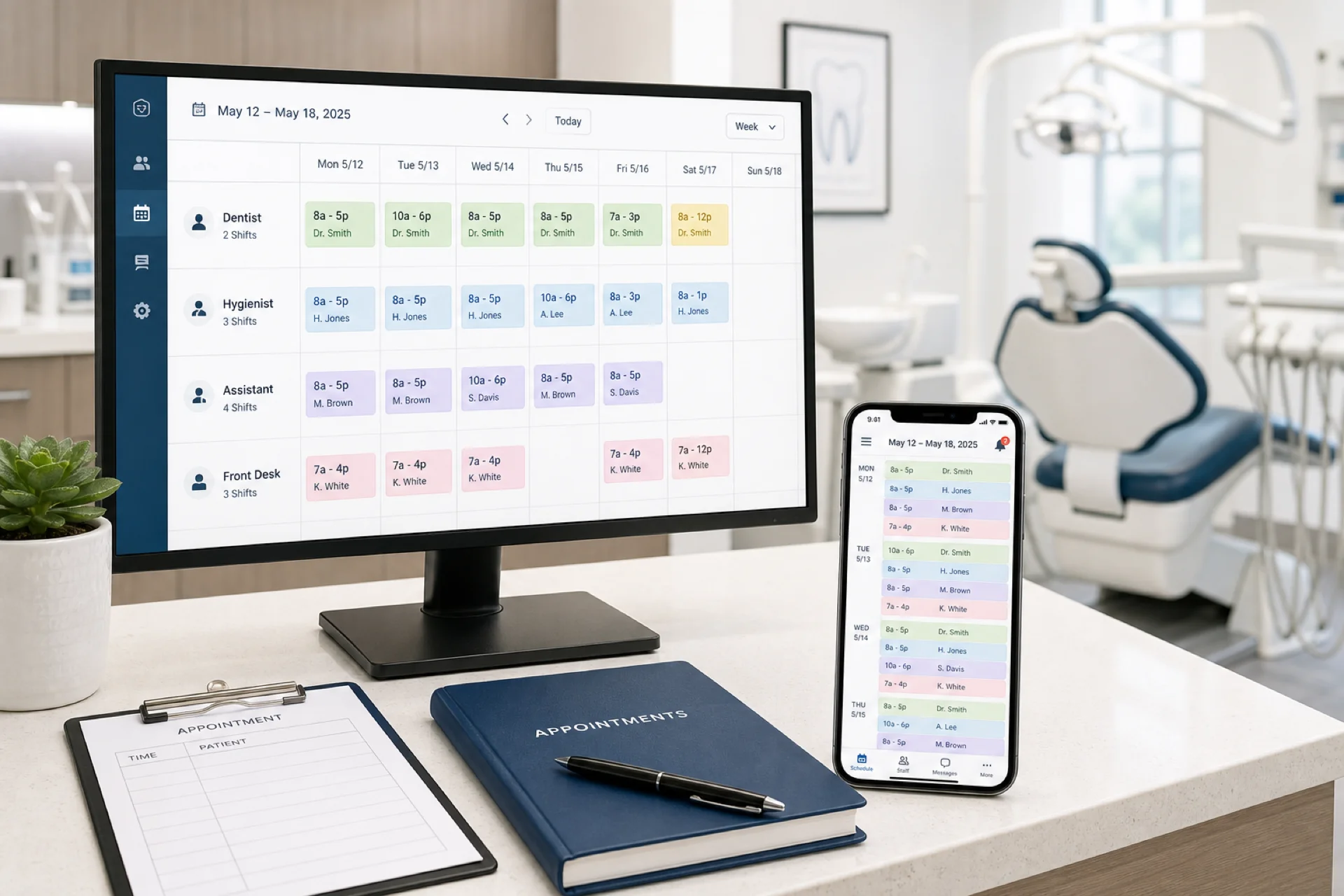
Best employee scheduling software for dental practices (2026 guide)
Compare the best employee scheduling software for dental practices in 2026: hygienist and front desk scheduling, attendance, leave, mobile access, and multi-location support.
Read article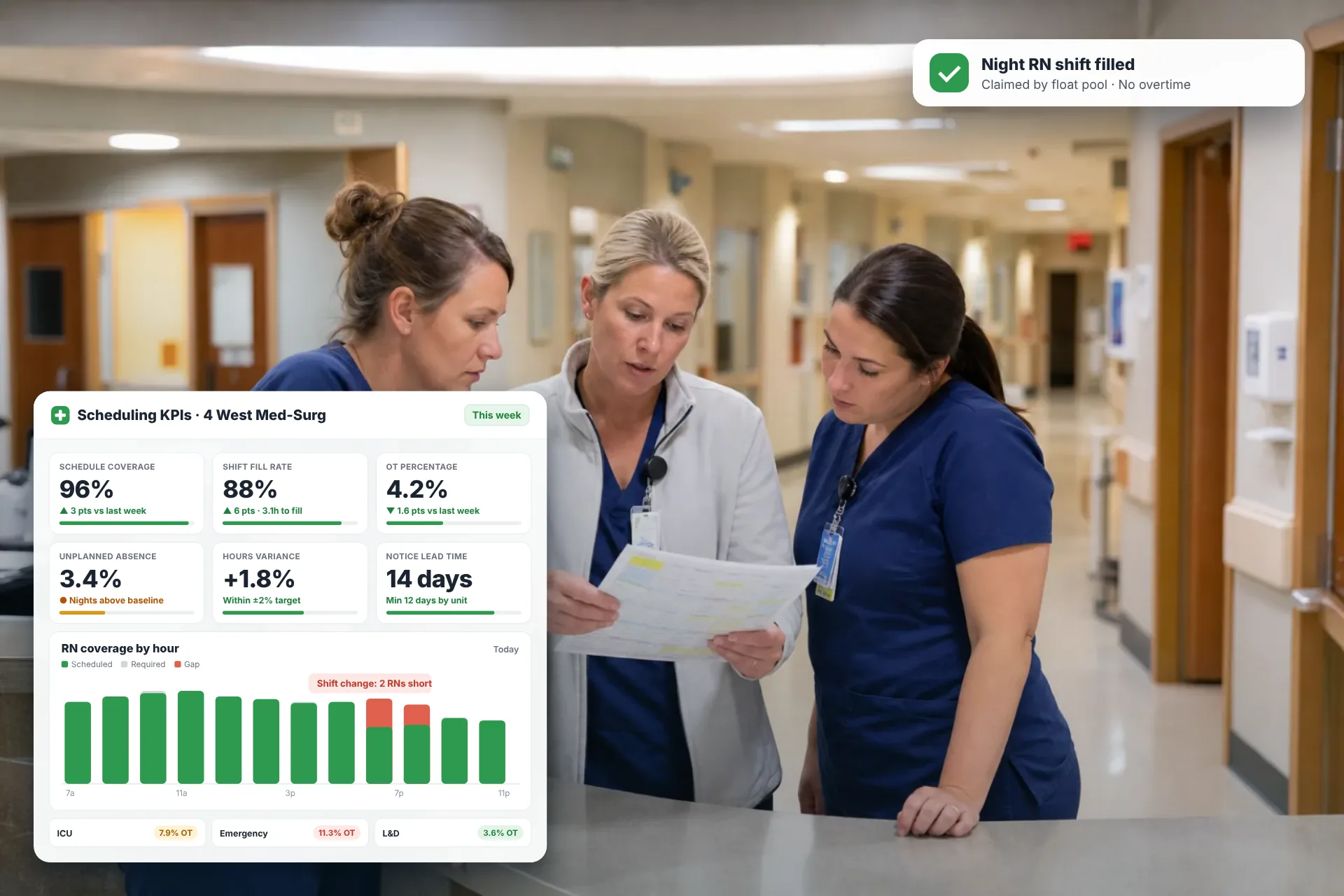
Employee Scheduling KPIs: 12 Metrics Every Operations Manager Should Track
Twelve employee scheduling KPIs with formulas, review cadences, and first actions, plus the trade-offs between them that most KPI lists skip.
Read article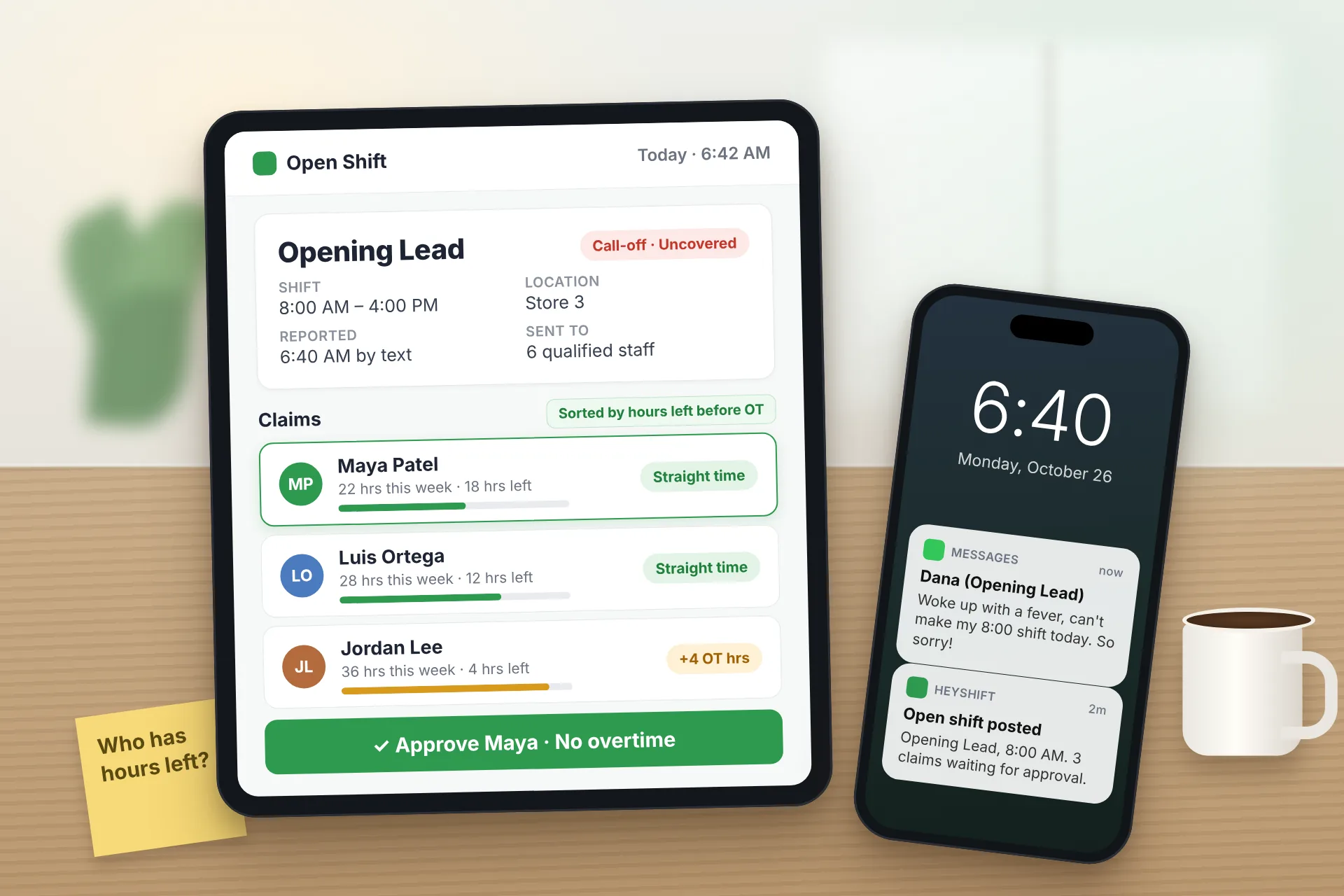
Same Day Employee Call Off Coverage: How to Handle Call-Offs Without Creating Overtime
A 30-minute response sequence for same-day call-offs: build a qualified list, post an open shift to everyone at once, and check overtime before you approve anyone.
Read article