


Best Healthcare Staff Scheduling Software (2026): Compare the Top Solutions
Compare the best healthcare staff scheduling software for hospitals, clinics, nursing homes, assisted living, and home healthcare agencies. Features, pricing factors, and buying guidance for growing care organizations.
Why healthcare scheduling is more complex than other industries
Healthcare scheduling is not just about assigning employees to shifts. Every decision directly affects patient care, staff wellbeing, and operational efficiency. Hospitals, clinics, nursing homes, and home healthcare agencies must balance employee availability with fluctuating patient demand while maintaining appropriate staffing levels.
Unlike retail or office environments, healthcare organizations often operate 24 hours a day, seven days a week. Managers coordinate multiple departments, rotating shifts, weekends, holidays, and emergency coverage without relying on spreadsheets or endless phone calls.
Modern healthcare employee scheduling software automates repetitive tasks, improves communication, and gives managers a clear view of workforce availability across inpatient, clinic, and field workflows.
Signs you have outgrown manual scheduling
Many healthcare providers begin with spreadsheets or paper schedules. As teams grow, these methods become difficult to maintain.
Common warning signs include:
- Managers spend several hours every week building schedules
- Employees frequently miss schedule updates
- Shift swaps are handled through phone calls or text messages
- Overtime costs continue increasing
- Multiple clinics or departments use separate schedules
- Managers struggle to find replacements when employees call in sick
- Employees cannot easily view schedules from their mobile devices
If your organization experiences several of these challenges, healthcare scheduling software can reduce administrative work while improving workforce coordination.
Features to look for in healthcare scheduling software
| Feature | Why healthcare buyers prioritize it |
|---|---|
| Employee scheduling | Publish official weeks by unit, site, or route |
| Attendance tracking | Planned vs worked before payroll |
| Leave management | PTO visible while building schedules |
| Shift swapping | Flexibility with manager approval |
| Open shifts | Internal fill before overtime or agency |
| Employee availability | Credentials, constraints, and PTO beside the grid |
| Mobile app | Deskless clinical and field staff live on phone |
| Overtime monitoring | Alerts while planning, not after export |
| Workforce reporting | OT, fill rate, variance by department |
| Payroll support | Clean export or integration path |
| Multi-location | Health system or agency roll-up |
Publish-first discipline still wins: one authoritative roster beats chat screenshots. See open shift and swap approvals.
Feature depth: what "good" looks like in demos
Scheduling: Template by unit or site; copy week; bulk publish; role and credential tags where applicable.
Attendance: Clock or mobile check-in tied to assigned shift band, not only total daily hours.
Leave: Approved PTO blocks assignment before publish, not discovered at handoff.
Overtime: Threshold warnings on draft schedules and live weeks.
Mobile: Open shifts, swaps, schedule change notifications without manager screenshots.
Reporting: OT hours, fill rate, absenteeism, and payroll variance exportable by department.
If a vendor excels at calendar UI but hides labor totals until payroll, healthcare buyers feel pain within 90 days.
Essential features to look for in healthcare staff scheduling software
Choosing healthcare staff scheduling software involves more than comparing prices. Healthcare organizations should evaluate how well the platform supports day-to-day workforce management across nurse scheduling software, caregiver scheduling software, and support-staff workflows.
Fast schedule creation
Managers should build weekly schedules in minutes rather than hours using templates, copy-week, and bulk publish.
Mobile schedule access
Employees should know when and where they work without contacting managers. Demo the employee app, not only the admin grid.
Employee availability management
Managers should view availability, approved leave, and credentials before assigning shifts.
Shift change management
Software should update schedules and notify staff instantly on the official roster, not through parallel group texts.
Multi-location scheduling
Centralized scheduling across hospitals, clinics, or facilities gives district leaders roll-up hours without spreadsheet merges.
Reporting and workforce visibility
Real-time OT pacing, fill rate, and planned-vs-worked reporting helps nursing and finance share one weekly cadence.
These essentials extend the feature table above. Use both when scoring vendors during trial.
Best healthcare scheduling software compared
1. Heyshift
Best for: growing healthcare organizations (roughly 20 to 500 employees) that want scheduling, attendance, leave, and labor visibility in one workflow.
Ideal for:
- Hospitals and regional medical centers
- Clinics and outpatient groups
- Nursing homes and skilled nursing
- Assisted living and memory care
- Home healthcare agencies
- Dental and multi-specialty practices
Key features
- Shift scheduling with publish-first discipline
- Attendance tracking tied to published shifts
- Leave management
- Shift swapping and open shifts on the official roster
- People and availability
- Mobile app for floor and field staff
- Workforce visibility and cost and labor insights
- Overtime monitoring while building the week
- Payroll export support
- Multi-location areas
Pros
- Easy to adopt for growing hourly and shift-based care teams
- 30-day free trial with features unlocked for evaluation
- Modern interface on web and mobile
- Attendance included, not a separate bolt-on
- Built for operators adding sites without enterprise IT overhead
Consider
- Enterprise integrations and advanced compliance modules continue to expand as the platform evolves; confirm your payroll and HRIS path on pricing during evaluation
Ideal buyer profile: Nurse managers and operations leads who need one official week across departments without a six-month implementation.
Start 30-day free trial for multi-site rollouts.
Why growing healthcare operators pick Heyshift: Implementation stays nurse-manager-led instead of IT-project-led. Attendance ships in the same trial as scheduling, so buyers test the full payroll-variance story. Multi-location roll-up avoids the Sunday-night spreadsheet merge regional directors describe during demos.
Pricing note: Compare total cost at your actual headcount and site count on pricing, not entry-tier list prices alone. Healthcare buyers should model year-one cost including managers who need mobile and reporting seats.
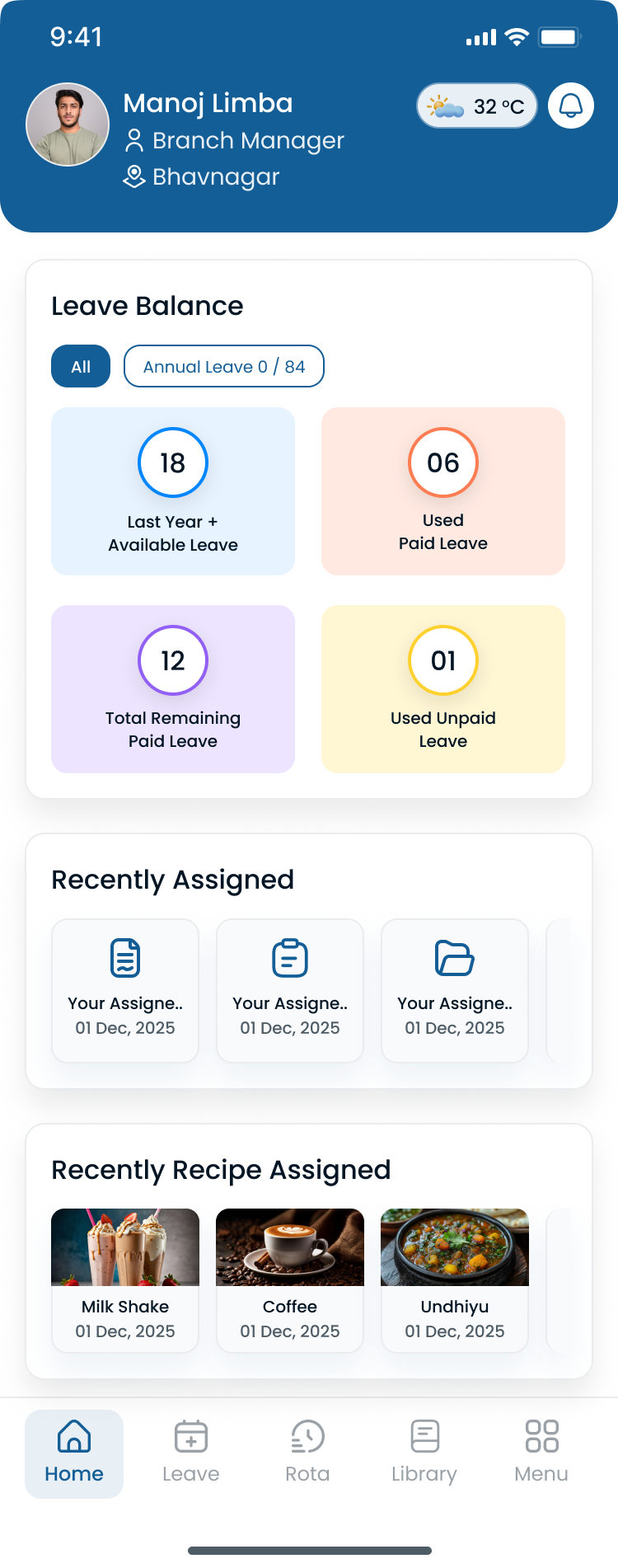
Buyers should see hour totals and coverage beside the grid during demos, not only a static calendar.
2. Deputy
Best for: enterprise healthcare organizations with advanced compliance and labor rule requirements at scale.
Pros
- Strong scheduling automation on higher tiers
- Labor compliance tooling for complex wage and hour environments
- Multi-location support for large operators
Cons
- Total cost often rises with headcount and sites
- Setup and configuration can feel heavy for smaller clinic or LTC pilots
See Deputy alternative for a structured Heyshift comparison.
Healthcare fit: Regional hospital systems and large multi-state clinic groups with dedicated workforce admins and compliance teams. Less ideal for a 40-bed skilled nursing wing that needs publish live in two weeks without consultant support.
Evaluation tip: Ask Deputy to demonstrate overtime rules and break compliance beside scheduling in your state context before you compare calendar features alone.
3. Connecteam
Best for: mobile healthcare teams and home healthcare providers that prioritize field communication alongside scheduling.
Pros
- Mobile-first employee experience
- Communication, training, and engagement tools on higher tiers
- Useful for dispersed caregiver teams
Cons
- Multi-location scheduling depth and reporting may require upgrades
- Evaluate publish workflow vs chat features before buying
Fit check: Home health and community nursing groups with heavy field coordination; less ideal when inpatient unit templates and float rules dominate.
Read home healthcare scheduling best practices and caregiver scheduling best practices.
Healthcare fit: Agencies with 50+ field caregivers who already use mobile for forms and chat. Inpatient units with complex float rules should verify multi-department templates during trial.
4. When I Work
Best for: smaller healthcare teams with straightforward scheduling needs and limited multi-department complexity.
Pros
- Familiar UX for small hourly teams
- Scheduling and team messaging basics
- Fast initial setup
Cons
- Overtime visibility and workforce reporting can feel limited for multi-unit hospitals
- Multi-location roll-up may not match health system expectations without workarounds
Healthcare fit: Single-site outpatient clinics, therapy offices, and small dental groups under roughly 40 hourly staff with one manager publisher.
5. Sling
Best for: budget-friendly basic scheduling when advanced healthcare workforce analytics are not yet required.
Pros
- Affordable entry pricing
- Scheduling and shift messaging fundamentals
Cons
- Workforce reporting and multi-location depth can feel limited as operators grow past two sites
- Attendance and leave depth may trail dedicated workforce platforms
See Sling alternative.
Healthcare fit: Operators testing digital scheduling for the first time with tight software budget and one location.
6. Homebase
Best for: small clinics and practices with simple scheduling needs and very small headcount.
Pros
- Fast setup for owners new to digital scheduling
- Scheduling and time tracking familiarity for small business operators
Cons
- Multi-location scalability and district roll-up can feel limited as practices add sites
- Advanced OT pacing and clinical rotation rules may require manual workarounds
See Homebase alternative.
Healthcare fit: Solo or two-provider practices scheduling front desk and clinical support on one weekly grid.
Healthcare scheduling software comparison table
Use this table as a starting point. Verify details on each vendor's current pricing and plan pages during evaluation.
| Feature | Heyshift | Deputy | Connecteam | When I Work | Sling | Homebase |
|---|---|---|---|---|---|---|
| Employee scheduling | Yes | Yes | Yes | Yes | Yes | Yes |
| Attendance tracking | Yes | Yes | Yes | Limited | Basic | Yes |
| Leave management | Yes | Yes | Yes | Limited | Basic | Basic |
| Shift swapping | Yes | Yes | Yes | Yes | Yes | Limited |
| Mobile app | Yes | Yes | Yes | Yes | Yes | Yes |
| Multi-location | Yes | Yes | Limited | Limited | Limited | Limited |
| Overtime visibility | Yes | Yes | Limited | Limited | Basic | Limited |
| Workforce reporting | Yes | Yes | Limited | Basic | Basic | Basic |
| Open shifts | Yes | Yes | Varies | Yes | Yes | Limited |
| Publish-first roster | Yes | Yes | Varies | Yes | Yes | Yes |
How to read this table: "Limited" means capability may exist but depth, roll-up, or healthcare-specific workflow may require upgrades or manual process. Always pilot your heaviest unit during trial.
Pricing and total cost factors
Healthcare buyers should compare vendors on year-one total cost, not only per-user list price:
| Cost driver | Question to ask |
|---|---|
| Headcount | Per-employee vs flat site pricing at 200+ staff |
| Sites | Multi-location fees on tiers |
| Managers vs staff | Who needs a paid seat for publish and approvals |
| Attendance | Bundled or separate module |
| Payroll export | Integration fees or manual export labor |
| Support and onboarding | Included hours vs paid implementation |
Run employee scheduling software ROI guide math with manager hours saved and OT reduction scenarios from healthcare overtime management.
How to choose by care setting
Hospitals and acute care
Prioritize unit templates, float visibility, overtime alerts, multi-department scheduling, and attendance beside published bands. Spreadsheet grids break when ED, med-surg, and surgical units each maintain separate files.
Hospital buyers should ask vendors to demo:
- Separate templates for ED, ICU, and med-surg on one account
- Float nurse credentials visible on assignment
- Hour totals for staff who float between units same week
- Open-shift notifications filtered by unit qualification
Read hospital staff scheduling best practices. Compare nurse scheduling software.
Clinics and outpatient groups
Match staffing to appointment demand, support extended hours, and roll up multi-site provider groups. Publish discipline matters as much as calendar UI.
Clinic buyers should verify provider and support staff can share one weekly grid with role labels (MA, RN, front desk) without separate files per provider.
Read clinic staff scheduling best practices.
Nursing homes and assisted living
Weekend pools, CNA mix, and 12-hour bands need fair rotation history on the official roster. LTC buyers feel pain when weekend fairness lives in a notebook while software only holds weekday lines.
Download the nurse schedule template, 12-hour nurse schedule template, or 2-2-3 shift schedule template to standardize bands before software import.
Read how to create a nursing home staff schedule and assisted living staff scheduling best practices. See nursing home scheduling software.
Home healthcare and caregivers
Route planning, visit windows, on-call bands, and mobile field staff drive purchase criteria. Buyers should demo caregiver mobile flows, not only admin desktop grids.
Read best employee scheduling software for home healthcare agencies and home healthcare scheduling best practices.
Dental and small practices
Simpler session grids still benefit from attendance, leave, and swap policy on one platform. Practices adding a second location should buy multi-site capability early even if headcount is modest.
Read best employee scheduling software for dental practices.
Side-by-side: who each vendor serves best
| If your organization is... | Start your short list with... |
|---|---|
| Growing hospital or multi-site LTC (20-500 staff) | Heyshift, Deputy |
| Large enterprise health system | Deputy, Heyshift |
| Home health agency, mobile-heavy | Heyshift, Connecteam |
| Small clinic or dental (under 40 staff) | Heyshift, When I Work, Homebase |
| Budget-first single site pilot | Sling, Homebase |
Most buyers evaluate two vendors on one real unit for four weeks before signing annual contracts.
Benefits by healthcare organization type
Healthcare workforce management software delivers different wins depending on care setting. Use this section alongside the vendor comparison when you map requirements to your organization.
Hospitals
Large hospitals benefit from centralized scheduling across departments, float visibility, and overtime alerts. Compare healthcare staff scheduling software and the hospital staff roster template.
Medical clinics
Clinics simplify weekly scheduling for providers, MAs, and front desk staff across single or multi-site groups. Read clinic staff scheduling best practices.
Home healthcare agencies
Caregivers receive updated schedules in the field with mobile access and on-call bands. See best employee scheduling software for home healthcare agencies.
Nursing homes
Managers coordinate rotating CNA and nurse shifts while keeping weekend pools fair on the official roster. Explore nursing home scheduling software.
Urgent care centers
Flexible scheduling helps teams respond to census swings with per-diem pools and rapid open-shift fill. Pair with healthcare overtime management.
Buying guide: evaluate before you sign
Evaluate employee scheduling software for healthcare on outcomes, not demo theater.
| Criterion | What to verify in trial |
|---|---|
| Ease of scheduling | Can a nurse manager publish one unit in under 30 minutes after onboarding? |
| Attendance tracking | Do punches reference published assignment? |
| Overtime alerts | Do warnings appear while building the week? |
| Leave management | Does approved PTO block assignments? |
| Mobile app | Do floor staff see open shifts and updates without asking for screenshots? |
| Reporting | Can finance and nursing share OT pacing weekly? |
| Payroll integration | Does export match your provider's import format? |
| Multi-location support | Can you roll up four sites without merged Excel? |
| Scalability | Can you add a fifth site without reimplementation? |
Demo questions for healthcare buyers
- Show me hour totals by employee while the schedule is still a draft.
- How do open shifts notify only qualified staff for each unit?
- Where does leave appear relative to publish?
- Can I compare planned vs worked hours before payroll export?
- How do you support a nurse who works at two sites in one week?
- What does mobile look like for a CNA with no desk?
Implementation sequence
| Phase | Focus |
|---|---|
| Week 1-2 | Pilot one high-pain unit or site |
| Week 3-4 | Add attendance and leave visibility |
| Week 5-8 | Expand departments; train open-shift pickup |
| Week 9+ | Roll up reporting for leadership |
Read shift scheduling software buyer's guide and employee scheduling software ROI guide.
Common mistakes when choosing scheduling software
Many healthcare organizations purchase scheduling software without considering long-term operational needs.
Avoid solutions that:
- Are difficult for employees to learn
- Require excessive manual work after the first publish
- Cannot support multiple locations on one account
- Lack mobile accessibility for deskless clinical and field staff
- Do not simplify communication around schedule changes
- Are difficult to scale as your organization adds sites or departments
Selecting software that fits future growth often provides greater long-term value than choosing the lowest-priced solution.
How a multi-location healthcare group chose software
Before: 320 employees, four locations, manual grids
A healthcare organization with roughly 320 employees across four locations ran scheduling through department spreadsheets, staffing office texts, and paper attendance sign-in. Overtime exceeded budget most months. Call-offs triggered phone trees. Finance and nurse managers argued over which roster was official during payroll variance reviews.
Evaluation criteria leadership used
The buying team weighted scheduling, attendance, overtime visibility, leave, mobile access, and multi-site roll-up equally. They piloted two vendors on one clinic site and one LTC wing for four weeks each.
After: centralized platform
The group selected a platform that combined publish-first scheduling, mobile open shifts, attendance tied to planned assignments, leave blocks before publish, and weekly OT reports shared by nursing and finance.
| Metric | Before | After |
|---|---|---|
| Schedule versions | Parallel Excel per department | One published roster per site |
| OT discovery | Payroll export | Planning-time alerts |
| Call-off fill | Phone tree | Mobile open shifts |
| Cross-site visibility | Manual merges | District roll-up in one account |
| Payroll variance | Frequent corrections | Narrowing planned vs worked gap |
Coverage stayed stable. Unnecessary overtime fell because managers saw gaps earlier. The win was visibility, not cutting patient-facing hours.
What the buying team would do differently
They reported three lessons for other healthcare groups:
- Pilot the hardest unit first, not the friendliest manager site
- Include finance in week two, not after contract signature
- Measure OT and variance baseline for 90 days before claiming ROI
Why teams move beyond spreadsheets
Spreadsheets fail as medical staff scheduling software substitutes:
- Multiple unofficial schedule versions per unit
- Communication gaps when chat replaces publish
- Attendance tracked separately from the roster
- No overtime alerts while hours are planned
- Limited reporting across sites and departments
Read why spreadsheets fail for workforce scheduling and workforce scheduling software vs Excel.
CMS quality programs under Medicare quality initiatives increase leadership scrutiny on organized operations. Software does not replace clinical standards, but it helps leaders align planned and worked hours when questions arise.
Spreadsheet vs healthcare scheduling software
| Manual scheduling | Healthcare scheduling software |
|---|---|
| Manual updates | Automated scheduling workflows |
| Phone calls | Instant notifications |
| Limited visibility | Real-time workforce dashboard |
| Difficult shift changes | Quick schedule updates |
| Multiple spreadsheets | Centralized scheduling |
| Higher administrative workload | Faster workforce planning |
How healthcare scheduling software improves employee experience
Healthcare professionals already work in demanding environments. Scheduling software reduces unnecessary administrative friction by making schedules easier to access and update.
Benefits for employees include mobile schedule access, faster updates, visibility into upcoming shifts, manager communication without phone trees, less confusion from parallel files, and easier swap planning in one app.
Employee adoption drives ROI. A platform managers love but floor staff ignore recreates the spreadsheet problem in a prettier UI.
How scheduling software reduces labor cost
The right healthcare workforce management software helps organizations:
- Reduce overtime with planning-time visibility and internal open shifts
- Improve attendance accountability beside published shifts
- Fill gaps faster with approved swap and pickup workflows
- Cut manager hours spent on call-off scramble
- Roll up multi-site hours without merged exports
Pair vendor trials with the overtime risk calculator and labor cost percentage calculator. SHRM workforce planning guidance connects scheduling discipline to retention and cost control.
ROI signals healthcare buyers track in the first 90 days
| Signal | Direction that indicates fit |
|---|---|
| Manager scheduling hours | Down week over week |
| OT hours per unit | Flat or down with stable census |
| Internal open-shift fill rate | Up before doubles |
| Payroll variance | Narrowing vs published plan |
| Staff complaints about schedule fairness | Down in pulse surveys |
Software that only improves calendar aesthetics without labor KPI movement is a weak healthcare fit.
Why growing healthcare organizations choose Heyshift
Heyshift is designed to simplify workforce scheduling without adding unnecessary complexity.
Healthcare organizations choose Heyshift because they can:
- Create schedules faster with publish-first discipline
- Manage multiple locations from one account
- Improve employee communication around changes and open shifts
- Reduce manual scheduling and call-off scramble
- Improve workforce visibility for nursing and finance
- Support growing teams from roughly 20 to 500 employees
- Access schedules from anywhere on web and mobile
Whether managing a private clinic or a regional healthcare network, Heyshift provides a simple way to organize staff schedules alongside attendance, leave, and labor visibility. Explore healthcare staff scheduling software, compare employee scheduling software capabilities, and start a 30-day free trial on your highest-pain unit.
Migrating from spreadsheets and legacy tools
Healthcare groups rarely switch scheduling systems on a quiet week. Plan migration as an operational project with clinical stakeholders, not only IT.
Pre-migration checklist
| Step | Action |
|---|---|
| 1. Name the official publisher | One role owns publish per site or system |
| 2. Export history | Four weeks of schedules and attendance for baseline |
| 3. Standardize shift bands | Day, night, weekend labels match software templates |
| 4. Import roster | Employees, roles, sites, credentials |
| 5. Pilot unit | Run parallel publish one cycle if union or policy requires |
| 6. Train mobile | CNAs and field staff install app before go-live |
| 7. Cut parallel files | Stop email PDF as official week on go-live date |
Common migration mistakes
Big-bang without pilot: every unit fails publish on the same Sunday.
Ignoring per-diem and agency: they still live in texts while employees move to software.
Skipping attendance cutover: scheduling goes live but payroll still reconciles old sign-in sheets.
No finance cadence: OT pacing review starts month two instead of week two.
Read fair staff rotas when migration is also a fairness reset for weekends and evenings.
Security and rollout considerations
Healthcare buyers should confirm vendor practices for access control, audit trails, and role-based permissions during procurement:
- Who can publish vs propose vs view only
- Whether managers see only their unit or district-wide hours
- How swap and open-shift approvals are logged
- Mobile session handling for shared devices on floors
Scheduling software is not an EMR, but it still holds workforce data that matters for HR and compliance reviews. Include HR and IT in vendor security questionnaires early, not after contract signature.
Rollout sequencing that works for care organizations:
- Staffing office and one pilot unit (weeks 1-2)
- Attendance alignment with payroll partner (weeks 3-4)
- Remaining departments by pain priority (weeks 5-8)
- Executive reporting for OT and fill rate (week 9+)
Healthcare buyers should confirm OT pacing views during trial, not only calendar features.
Final recommendation
The best healthcare staff scheduling software for your organization is the platform your managers publish every week and your clinical, care, and support staff actually use on mobile.
Choose Heyshift if you are a growing healthcare operator (roughly 20 to 500 employees) that wants scheduling, attendance, leave, overtime visibility, and multi-location support in one modern workflow without enterprise implementation overhead.
Consider Deputy if you are a large operator prioritizing compliance automation at scale and have IT capacity for heavier setup.
Consider Connecteam if mobile field communication is equally important as inpatient-style grids.
Consider When I Work, Sling, or Homebase if you are a very small team with simple scheduling today, with a plan to reevaluate before multi-site complexity arrives.
Vendor scorecard template
Rate each finalist 1 to 5 during trial:
| Criteria | Weight | Vendor A | Vendor B |
|---|---|---|---|
| Publish speed | High | ||
| OT visibility | High | ||
| Attendance fit | High | ||
| Mobile adoption | High | ||
| Multi-site roll-up | Medium | ||
| Leave workflow | Medium | ||
| Reporting for finance | Medium | ||
| Total year-one cost | High | ||
| Implementation effort | Medium |
Weight criteria for your setting: hospitals weight float and OT highest; home health weights mobile field UX highest; small clinics weight setup speed highest.
Why this page exists in your evaluation journey
Operational guides like hospital staff scheduling and healthcare overtime management explain what good workforce discipline looks like. This comparison helps you buy software that enforces that discipline at scale.
If you already read best employee scheduling software for healthcare teams, treat this article as the updated bottom-funnel short list with fuller vendor coverage and setting-specific buying paths.
Choosing the right scheduling software helps healthcare organizations spend less time managing schedules and more time delivering quality care. Heyshift combines employee scheduling, attendance tracking, leave management, overtime visibility, and workforce communication in one easy-to-use platform designed for growing teams.
Review pricing. Start a 30-day free trial or contact Heyshift with your site count, care settings, and shift models.
Buy the system that becomes the official week, not the calendar your managers export to email.
Related Healthcare Resources
- Healthcare Staff Scheduling Software
- Employee Scheduling Software
- Best Employee Scheduling Software for Home Healthcare Agencies
- Healthcare Workforce Management Guide
- Shift Scheduling Software Buyer's Guide
- Employee Scheduling Software ROI Guide
- Employee Shift Planning Guide
- Hospital Staff Scheduling Best Practices
- Nurse Shift Rotation Guide
- Healthcare Attendance Tracking
- Prevent Healthcare Overtime
- Nurse Schedule Template
- Healthcare Employee Schedule Template
- Hospital Staff Roster Template
Frequently Asked Questions
Continue with related topics
More articles on topics related to this one.
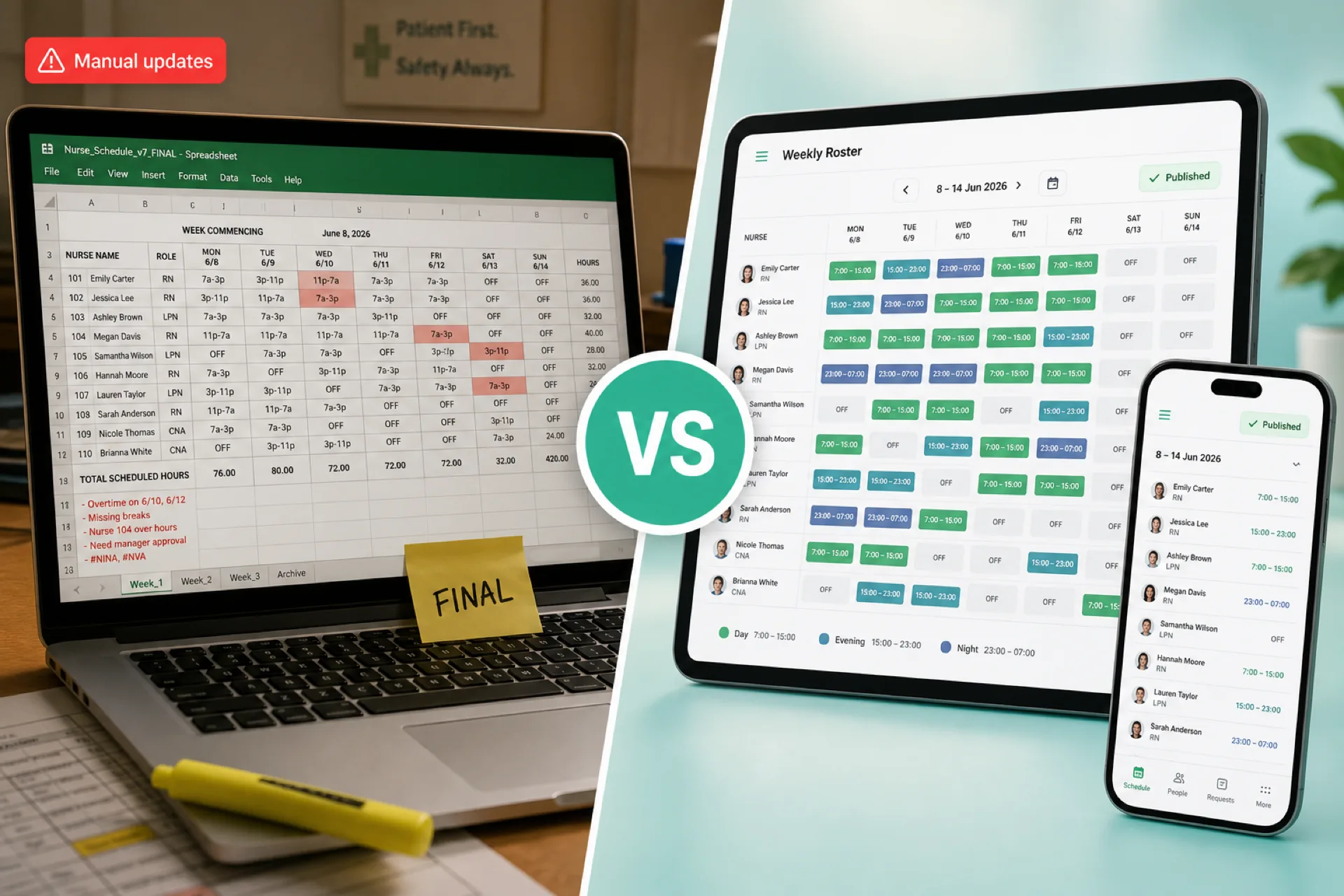
Healthcare Scheduling Software vs. Excel: Which Is Better for Managing Staff? (2026)
Compare healthcare scheduling software and Excel for staff scheduling, availability, open shifts, attendance, overtime, and multi-location workforce management. Learn when each option fits.
Read article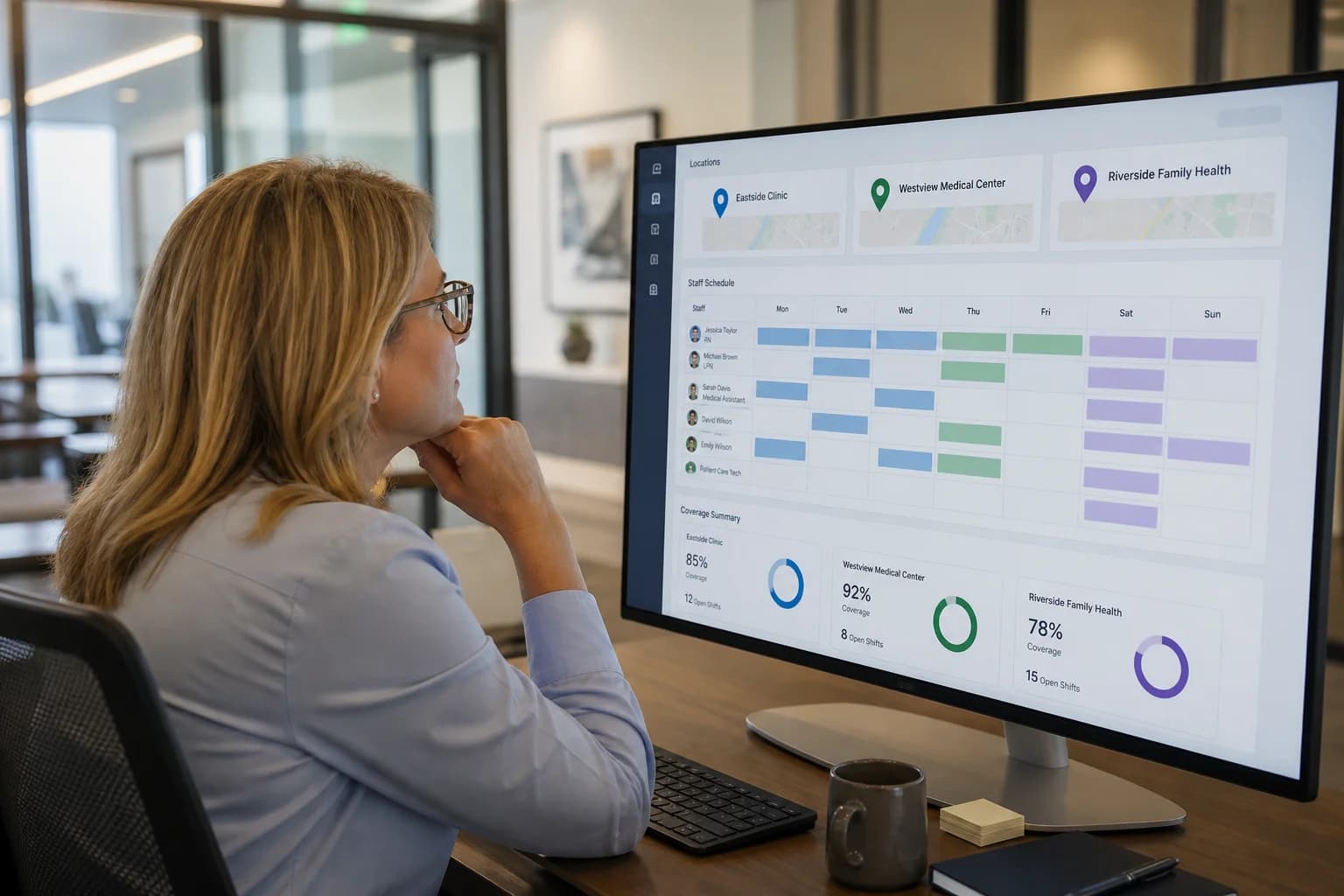
Multi-Location Healthcare Workforce Management: How to Manage Staff Across Multiple Facilities (2026)
Learn how multi-location healthcare organizations can manage employee schedules, availability, attendance, open shifts, overtime, and workforce operations across multiple facilities.
Read article
Home Healthcare Scheduling Software for Caregiver Management (2026)
Discover how home healthcare scheduling software helps agencies manage caregiver schedules, availability, open shifts, attendance, overtime, and multi-patient coverage.
Read article