

Healthcare Scheduling Software vs. Excel: Which Is Better for Managing Staff? (2026)
Compare healthcare scheduling software and Excel for staff scheduling, availability, open shifts, attendance, overtime, and multi-location workforce management. Learn when each option fits.
Healthcare scheduling software vs. Excel: which is better for managing staff? (2026)
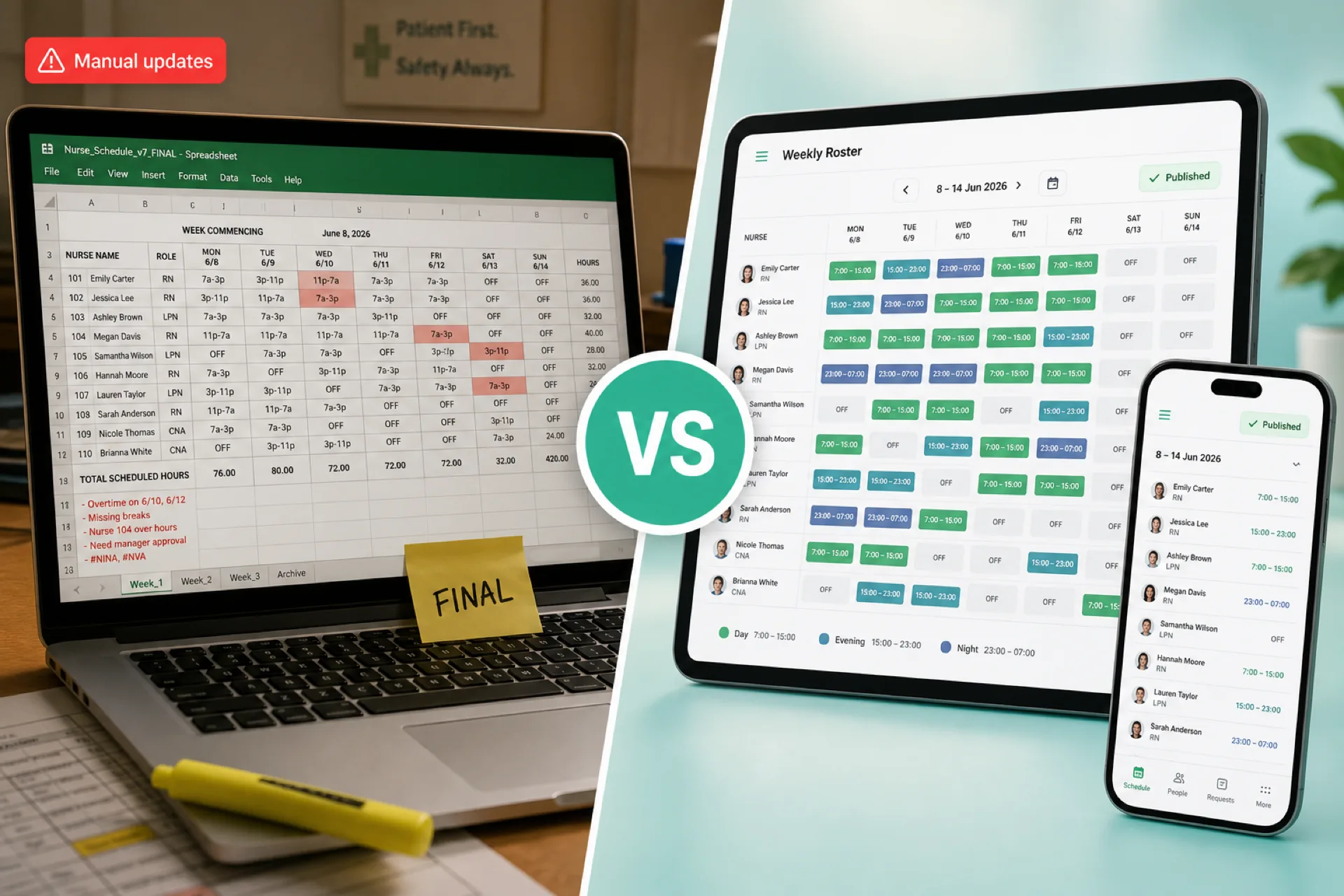
A clinic manager exports Week 34 to PDF, emails it, and prints a copy for the break room. By Wednesday, two nurses swapped shifts in a group text, a caregiver's availability changed in a separate tab nobody opened, and payroll still reflects Monday's version.
Excel and Google Sheets remain common healthcare scheduling spreadsheet tools. For a small team with predictable shifts, a grid can be a practical start. Healthcare scheduling gets harder as you add employees, departments, locations, open shifts, swaps, leave, and overtime tracking.
Featured answer: Is healthcare scheduling software better than Excel? Healthcare scheduling software is better than Excel when teams need one published roster, centralized availability, structured open shifts and swaps, attendance beside the schedule, and multi-location visibility. Excel can still work for small, stable teams with one manager and limited weekly changes.
Who should read this: Nurse managers, practice administrators, and operations leaders comparing healthcare scheduling software vs Excel before the next publish cycle or software trial.
Executive summary
Healthcare scheduling software vs Excel is an operational question: does your current tool reduce coordination work or create more of it?
In this guide you will find:
- What Excel can and cannot do for healthcare staff scheduling
- What healthcare scheduling software adds beyond a spreadsheet
- Feature comparison table for clinical workforce workflows
- When Excel is enough vs when software makes more sense
- Nurse, home health, and multi-location comparisons
- Total cost framing and an eight-step Excel-to-software migration path
- FAQ for decision-stage buyers
For a cross-industry comparison, see workforce scheduling software vs Excel. For template starting points, see healthcare staff scheduling templates.
Excel for healthcare staff scheduling
Excel and Google Sheets support Excel healthcare staff scheduling workflows many care teams already know.
Managers commonly use spreadsheets to build:
- Weekly and monthly staff schedules
- Nurse rosters by unit or department
- Day, evening, and night shift grids
- Employee availability lists in a second tab
- Vacation and leave trackers
- Working-hour totals with formulas
For a solo site with a dozen hourly staff and few weekly exceptions, that may be enough. Excel is a spreadsheet, not a workforce system. It does not publish one official roster, notify staff when the week changes, or route swap approvals on its own.
If you are standardizing columns before a future migration, start with healthcare staff scheduling templates or download the healthcare employee schedule template.
What healthcare scheduling software adds
Healthcare employee scheduling software is built around clinical workforce workflows, not generic cells and formulas.
Depending on the platform, teams may get:
- Employee scheduling with publish discipline
- Availability management beside the grid
- Open shift posting and fill workflows
- Shift swap requests with manager approval
- Leave management tied to the roster
- Attendance tracking aligned to scheduled shifts
- Time tracking and hour reconciliation
- Overtime visibility while building shifts
- Mobile access for nurses, caregivers, and support staff
- Notifications when schedules change
- Multi-location scheduling and roll-up reporting
- Workforce reports for labor and coverage
Software does not remove call-outs or staffing pressure. It reduces the manual work of keeping one published week current when reality changes on Tuesday.
Explore healthcare staff scheduling software for product depth on the Heyshift site.
Healthcare scheduling software vs. Excel: comparison table
| Feature | Excel / Google Sheets | Healthcare scheduling software |
|---|---|---|
| Basic schedule creation | Yes | Yes |
| Employee availability | Manual, often separate tab | Centralized beside assign |
| Open shifts | Phone lists and group texts | Structured post and fill |
| Shift swaps | Side deals and manual edits | Built-in request and approval |
| Leave management | Separate sheet or email | Centralized with publish |
| Attendance | Separate file or paper | Integrated with scheduled shifts |
| Time tracking | Manual entry or export | Integrated options |
| Overtime visibility | Manual formulas | Visible while building shifts |
| Employee access | PDF, email, screenshot | Web and mobile on official roster |
| Notifications | Manual outreach | Platform alerts from publish |
| Multiple locations | Separate files per site | Centralized with site control |
| Reporting | Manual pivots | Workforce and labor reports |
| Schedule changes | Re-send files and hope | One update on published roster |
| Scalability | Fragile as complexity grows | Designed for growing care teams |
Pair this table with operational playbooks: healthcare employee availability management, healthcare open shift management, and healthcare shift swapping.
When Excel may be enough
Excel remains a reasonable choice in some care settings. Do not treat every clinic as a failed spreadsheet story on day one.
Excel may work well when:
- The team is small (often under 20 to 25 hourly staff)
- Shifts are predictable week to week
- You operate one location
- Call-outs and swaps are infrequent
- Availability is simple and stable
- Overtime is limited and visible without heavy formulas
- One manager owns the grid and communicates changes directly
In these cases, a well-designed healthcare staff schedule template beats a blank workbook. The question is whether your next six months look like this week or like last month after flu season, a new site, and three float hires.
When healthcare scheduling software makes more sense
Healthcare workforce management software earns its place when spreadsheet maintenance starts competing with patient-facing work.
Multiple locations
Separate files per facility hide organization-wide availability, float pools, and labor totals. See multi-location healthcare workforce management.
Frequent schedule changes
Call-outs, swaps, and open shifts require constant updates. Shadow versions multiply when every change is a manual edit plus a re-send.
Large teams
More employees mean more shift combinations, credential mixes, and coverage rules Excel was not designed to enforce at publish time.
Complex availability
Recurring patterns, restricted days, and per diem pools are hard to keep in a tab managers forget to open before assign.
Frequent overtime
Premium hours stack across day, evening, and night bands. Manual hour totals often surface at payroll, not while the week is still a draft.
Read healthcare overtime management for habits that pair with software visibility.
Multiple departments
Inpatient units, clinics, and support services each need coverage rules. One shared spreadsheet tab rarely scales across departments without version conflicts.
Multiple managers
When more than one person edits schedules, conflicting files become the norm unless one system owns the published roster.
Healthcare scheduling software vs. Excel for nurses
Nurse scheduling software vs Excel debates usually start after rotation week, not during a quiet July.
Nurse teams may run:
- Day, evening, and overnight bands
- Weekend and holiday coverage
- Rotating patterns across units
- Float and per diem pools
- Cross-department coverage during surges
A spreadsheet can represent these grids. Managers still need manual processes for availability, swaps, open shifts, hour totals, and the official week staff trust on mobile.
For nursing-specific buyer criteria, read nurse scheduling software. For rotation discipline, see nurse shift rotation best practices. Inpatient buyers should also review hospital staff scheduling software.
Healthcare scheduling software vs. Excel for home healthcare
Home healthcare adds visit routing, assignment coverage, and field availability that clinic grids do not capture well.
Managers may need to coordinate:
- Caregiver availability across a week
- Patient or assignment blocks
- Service locations and travel time
- Shift duration and on-call bands
- Open visits when call-outs happen
- Working hours across dispersed staff
Excel can list visits in rows. It does not easily keep caregivers, dispatchers, and payroll aligned on one published plan when assignments change mid-week.
See home healthcare scheduling software and the home healthcare schedule template for field-team starting points.
Healthcare scheduling software vs. Excel for multi-location organizations
Multi-site healthcare groups often outgrow spreadsheets before leadership realizes the cost.
Excel-heavy operations commonly see:
- One file per facility with different column layouts
- Duplicate employee records across tabs
- Manual consolidation for leadership reports
- Limited visibility into float sharing across sites
- Delayed answers when one location needs coverage from another
A centralized platform can provide one scheduling environment with site-level control, so local managers still own their teams while operations sees roll-up labor and coverage.
Read multi-location healthcare workforce management and best healthcare staff scheduling software when evaluating platforms.
Cost of Excel vs. cost of scheduling software
The fair comparison is total administrative effort, not license price alone.
Excel
The spreadsheet may already be licensed, but organizations still pay in manager time for:
- Weekly schedule creation and rebuilds
- Manual updates after call-outs and swaps
- Phone and text outreach to fill open shifts
- Hour calculations and overtime checks
- Reconciling attendance against the grid
- Chasing which file version is official
Scheduling software
There is a subscription cost. Teams may gain structured workflows for scheduling, availability, open shifts, swaps, attendance, leave, and reporting in one place.
The decision question is not only "Which line item is cheaper?" It is: "Which approach costs less total coordination time for our workforce this quarter?"
Review pricing and employee scheduling software cost when building a business case. Software does not automatically fix understaffing or policy gaps. It should reduce spreadsheet tax.
How to decide between Excel and scheduling software
Use this simple framework:
Choose Excel if: your team is small, schedules are predictable, changes are limited, and one manager can own communication without version chaos.
Consider scheduling software if: you have frequent changes, multiple locations, complex availability, regular open shifts and swaps, attendance reconciliation pain, or overtime surprises after publish.
Hybrid path: many groups standardize columns in Excel or templates first, then migrate when change volume crosses a threshold. Healthcare staff scheduling templates document that bridge.
If spreadsheet pain is already weekly, read why spreadsheets fail for workforce scheduling for cross-industry failure modes that also apply in care settings.
How to move from Excel to scheduling software
Organizations ready to transition benefit from a deliberate rollout, not a Friday night import.
Step 1: Document your current scheduling process
Map who builds the grid, how changes propagate, and where staff actually look for their shifts.
Step 2: Identify manual work
Track hours spent on rebuilds, texts, coverage calls, and payroll corrections for two weeks.
Step 3: Identify recurring scheduling problems
Note patterns: open shifts, availability conflicts, swap confusion, attendance mismatches, overtime stacks.
Step 4: Define requirements
List must-haves: mobile access, swap approval, multi-site support, attendance integration, reporting.
Step 5: Import employee information
Set up employees, roles, departments, locations, and baseline shift patterns.
Step 6: Train managers
Focus on publish discipline, open shift fill, and swap approval on the official roster.
Step 7: Introduce employees
Give staff mobile access and clear rules for availability updates and swap requests.
Step 8: Measure results
Compare scheduling time, coverage gaps, overtime trends, and payroll corrections after four to six publish cycles.
Pair migration with healthcare staff attendance tracking so planned vs worked hours stay aligned from week one.
Why choose Heyshift?
Heyshift helps healthcare organizations that have outgrown healthcare scheduling spreadsheet maintenance move to one published workforce process.
Heyshift supports:
- Employee scheduling and mobile roster access
- Employee availability and leave beside the grid
- Open shifts and shift swaps with manager approval
- Attendance tracking and time tracking
- Overtime visibility before publish
- Multi-location scheduling and workforce reporting
Heyshift fits growing hospitals, clinics, home health agencies, and multi-site care groups that need structured workflows without a multi-year enterprise rollout. Moving to software does not remove call-outs or staffing math. It should reduce the hours managers spend maintaining files that staff no longer trust.
Review pricing. Start a 30-day free trial or contact Heyshift with your locations, shift bands, and roles.
Final thoughts
Excel remains useful for small healthcare teams with simple, predictable workforce needs.
As organizations grow, managing availability, open shifts, swaps, attendance, overtime, departments, and locations through spreadsheets often consumes more time than the grid saves.
Healthcare scheduling software vs Excel comes down to complexity: if your managers spend more energy maintaining files than improving coverage, structured software is the next operational step.
The best choice matches your size, change volume, and how much your staff trust the official week on their phones.
Related Healthcare Resources
- Healthcare Workforce Management Software
- Healthcare Scheduling Software Cost
- Healthcare Staff Scheduling Templates
- Healthcare Employee Availability Management
- Healthcare Open Shift Management
- Healthcare Shift Swapping
- Healthcare Staff Attendance Tracking
- Healthcare Overtime Management
- Multi-Location Healthcare Workforce Management
- Healthcare Staff Scheduling Software
Frequently Asked Questions
Continue with related topics
More articles on topics related to this one.

Best Healthcare Staff Scheduling Software (2026): Compare the Top Solutions
Compare the best healthcare staff scheduling software for hospitals, clinics, nursing homes, assisted living, and home healthcare agencies. Features, pricing factors, and buying guidance for growing care organizations.
Read article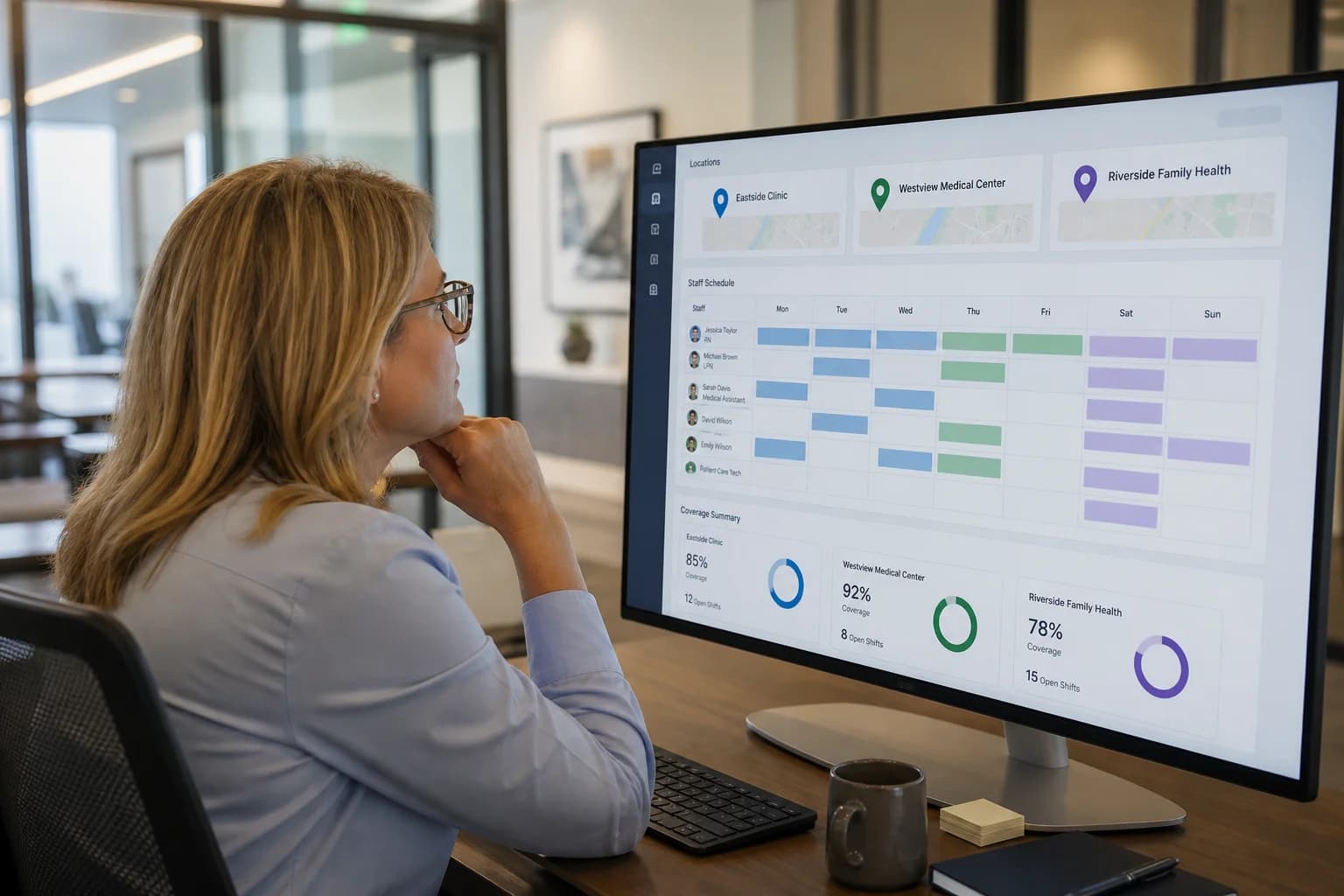
Multi-Location Healthcare Workforce Management: How to Manage Staff Across Multiple Facilities (2026)
Learn how multi-location healthcare organizations can manage employee schedules, availability, attendance, open shifts, overtime, and workforce operations across multiple facilities.
Read article
Healthcare Workforce Management: The Complete Guide for Hospitals, Clinics & Care Providers (2026)
Learn healthcare workforce management best practices for hospitals, clinics, and care providers: staff scheduling, attendance tracking, labor planning, overtime reduction, compliance, and workforce communication in one guide.
Read article